
Overview
Quality Owners can assign Action Plan tasks to specific individuals or functional teams, define due dates, and outline the required activities needed to resolve the underlying issue. Once assigned, progress can be monitored, documented, and tracked to completion. This structured workflow ensures accountability and visibility while enabling organizations to maintain compliance with ISO 9001, ISO 13485, FDA QSR, and general CAPA best practices.
By capturing Action Plans for various CQ records, ComplianceQuest maintains full traceability from the problem to the resolution. This alignment ensures that stakeholders can clearly see how each action relates to the evidence, analysis, and causes identified during each record, supporting stronger decision‑making and more effective long‑term prevention.
Prerequisites
Available in: Meetings, FMEAs, Laboratory Errors, Suspect Results, various Safety records
Installed Package: CQ Core, Lab OOS, EHS - Winter 2025
User Profile: Standard User
Permissions: CQ Base User PSG, CQ Record Owner PSG and/or Task Assignee PSG
Instructions
See Adding Action Plans for Investigation if the Action Plans you need to add are result of Root Cause Analysis during the Investigation process.
-
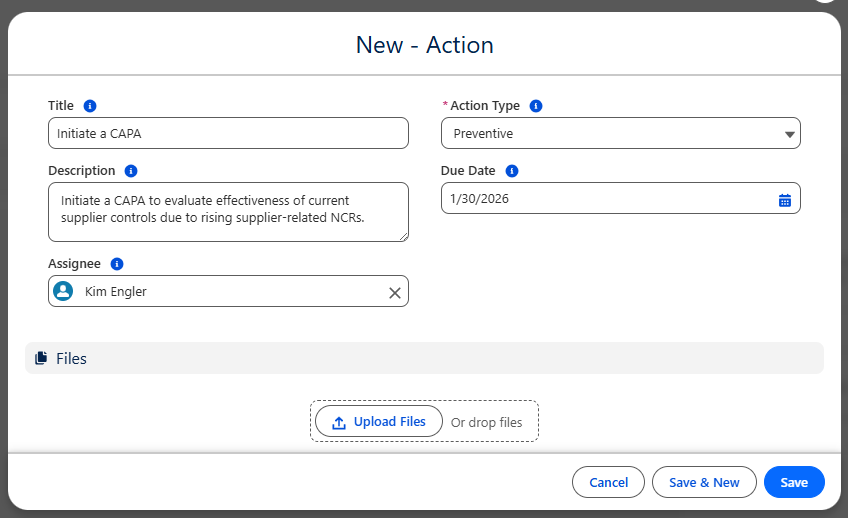
From the CQ record, click the Actions tab.

-
Enter the Title and Description of the Action.
-
Select the Action Type: Corrective, Preventive, Correction.
Detection will display only if CQ Design Quality is installed.
-
Select the Assignee and Due Date of the Action.
-
Optionally, Drop/Upload Files associated with the Action (photos, documents supporting the actions taken, etc.).
-
Click the Save button or Save & New for additional Actions.
Results
-
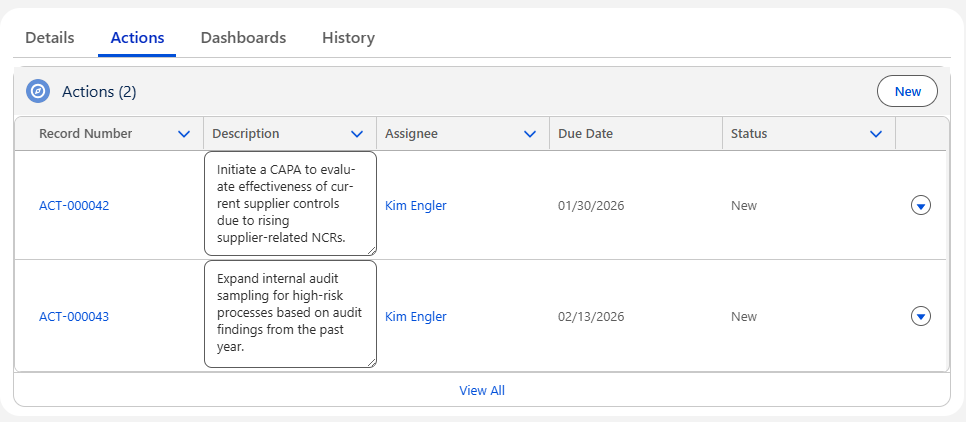
The Action Plans now display under the Actions tab of the CQ record.
-
Actions will be routed to Assignees based on the stage of the record in which Actions must be completed.
Troubleshooting
-
Check back for new articles
Additional Resources
CQ Resources
-
Completing Action Plans
Summer 2026