
Purpose
As a Complaint Owner, you can review similar complaints to identify potential duplicates and support accurate complaint classification.
Note: Similar Records shows complaints with matching attributes for the current Complaint.
Use it to review potential duplicates before creating or updating a record.
Important Notes
-
Mark as Duplicate applies only to similar complaints in Draft or Open status.
-
After marking a record as a duplicate, you can select Merge & Close.
-
You cannot merge and close a duplicate when:
-
The Primary Investigation is not complete
-
A Regulatory record is pending
-
You do not have edit access to the complaint
-
Prerequisites
Installed Package(s): CQ Core, CQ.AI Extension
Product: QualityQuest, Platform & Technology
Function: CQ.AI Agent
User Profile: Standard User
Permissions: CQ Base User PSG, CQ Complaint Owner PSG, and CQSS Similarity User PS
Steps
-
Open the Complaint record.
-
Click the CQ.AI section to expand it.
-
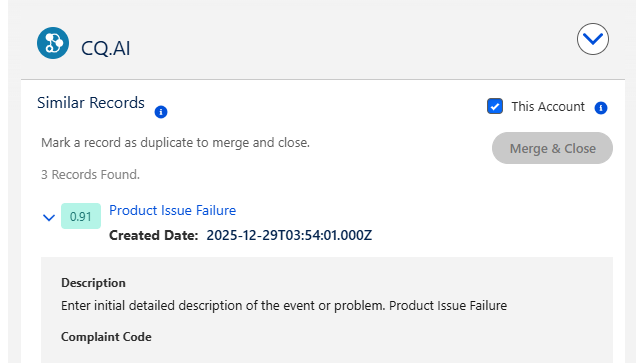
Select This Account to fetch similar complaints for the same account.
-
Clear This Account to fetch similar complaints across all accounts.
-
(Optional) Turn on Mark as Duplicate.
-
Click Merge & Close.
Example:
Expected Outcome
-
The merged Similar Record moves to the Close Stage and is set to Closed status.
-
The merged Complaint is added to the Related Complaints section under the Reference tab with the Reference Type: Duplicate.
Additional Resources
ComplianceQuest
We Value Your Feedback
To provide feedback or suggestions to improve the help content on this page click here.