
Purpose
As a Record Owner, you submit an NC investigation after completing the investigation details. You review the recorded findings and send the investigation forward so the nonconformance can continue through the workflow.
Prerequisites
Installation Package: CQ Core, myCQ Extension, CQ Supplier Central, CQ Supplier Performance, CQ Ratings Framework, CQ Embedded Analytics, and CQ AI Extension
Product: QualityQuest and Platform Apps
Function: CQ NC Investigation Submission
User Profile: Standard User
For Permission Set Groups: CQ Base User PSG, CQ NC Owner PSG
Steps
-
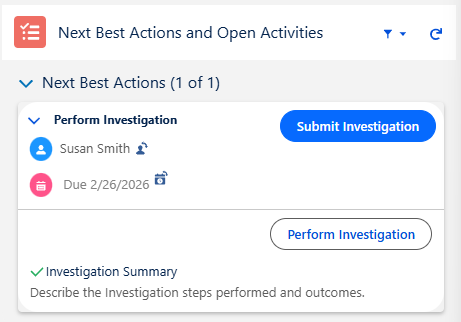
From the NC record, click the Submit Investigation button under Next Best Actions.
-
Enter Comment and Password if needed, and click the Save button.
Example:
Expected Outcome
Investigation Approval Required
-
The NC remains in the Disposition/Investigate Stage and moves to the Approve Investigation Sub-Stage as seen under Next Best Actions.
No Investigation Approval Required
-
The NC moves to the Implement Stage if Actions need to be completed or the Closed Stage if no Actions exist and/or have been completed.
Additional Resources
ComplianceQuest
We Value Your Feedback
To provide feedback or suggestions to improve the help content on this page click here.