
Assessing Risk
For Permission Set Groups: CQ Base User PSG, CQ NC Owner PSG
The NC Owner needs to perform a Risk Assessment on the nonconformity.
A Risk Assessment can be performed from the NC record using components of CQ’s Risk Management product.
If CQ’s Risk Management is not yet being used, the NC Owner can also attach any Risk Assessment results under the Notes and Files section of the NC record.
Risk Assessment can be performed any time the NC record is in Triage, and Open Stages; however, it is typically conducted during triage by the NC Owner in order to determine how Investigation will be carried out to determine a conclusion (NC Investigation, or CAPA Investigation).
Any number of Risk Assessments can be conducted in the NC (Initial, Final, etc.). The current Risk Assessment will display directly under the Investigation tab and any past Risk Assessments can be viewed from a View All NC Risk Assessments link.
CQ has provided a default Quantitative Risk Model that can be leveraged for NC Risk Assessments. Customers can choose to leverage this Risk Model for NC Risk Assessments or configure their own Risk Models to be used for NC Investigations.
CQ’s Risk Management solution also integrates with CQ Nonconformance records whereas NC Owners can view under the Reference tab of the NC whether or not any further Risk Treatments and Actions were conducted for the Product or Process NC.
-
From the NC record, Investigation tab, click the View All NC Risk Assessments link to view all Risk Assessments that have since been conducted for NCs.
-
In addition, the NC Owner can select the Click to View Analysis Report link to view any NC Defects that exist for the particular Product or Process identified in the NC.
-
See CQ End User Guide - Similarity and Recommendation for more information.

-
From the NC record, select the Assess Risk option from the Action Menu if a new Risk Assessment will need to be conducted.
-
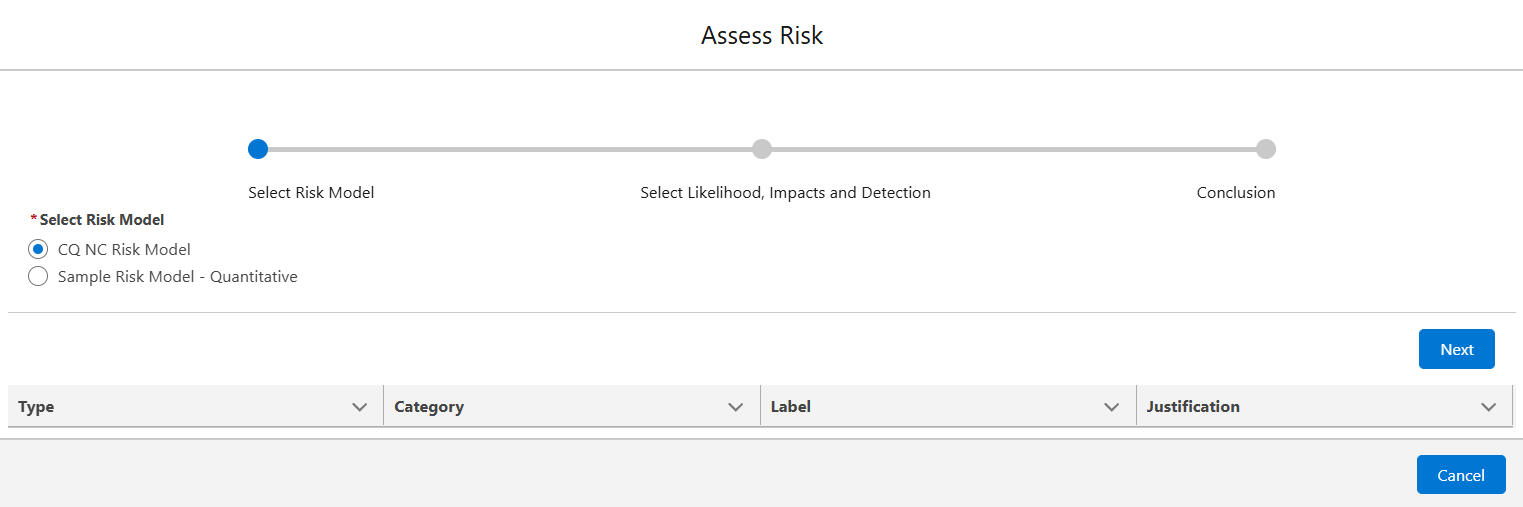
Select the CQ NC Risk Model option, then click the Next button. The CQ NC Risk Model is a baseline Risk Model provided by CQ. Any number of Customer-defined Risk Models can be configured during CQ implementations.
-
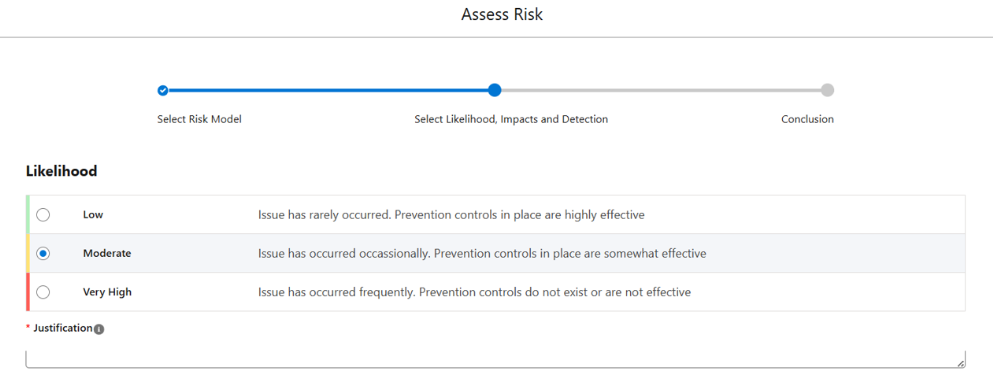
Complete the Risk Assessment questions and Justifications.
-
Click Next.
-
Enter Comment and Password if needed, and click the Finish button.
-
Any number of Risk Assessments can be performed in the NC.
Results
-
The Risk Assessment results are now displayed under the Investigation tab in the NC.
-
The Suggested Investigation Level field under the Detail tab will update based on Risk Assessment Conclusion. Options include NC Investigation, CAPA Investigation, or Trend which may have also been suggested prior to the Assess Risk action when the NC was first created and the Severity selected (or populated from the Defect/Failure Code).
-
Risk Assessments (current and past) can be viewed under the Investigation tab in the NC by either clicking the Current Risk Assessment link or selecting the View All NC Risk Assessments link.
-
Once the Risk Assessment has been completed, a Conclusion will display as seen below under the Assess Risk sign-off window. This Conclusion, along with the Risk Assessment Results, will transfer over to the Investigation tab so that the NC Owner can now determine what next steps need to take place in the NC to complete it.