
As a Part Creator, you can review the Part Import Error File to identify Parts that did not Import due to duplication and update the template before reimporting.
Prerequisites
Installation Package: CQ Core, CQ PLM Extension
Product: ProductQuest
Function: Standard Parts
User Profile: Standard User
Permissions: CQ Base User PSG and CQ PLM Creator PSG
Part Import Status: Complete
Steps
-
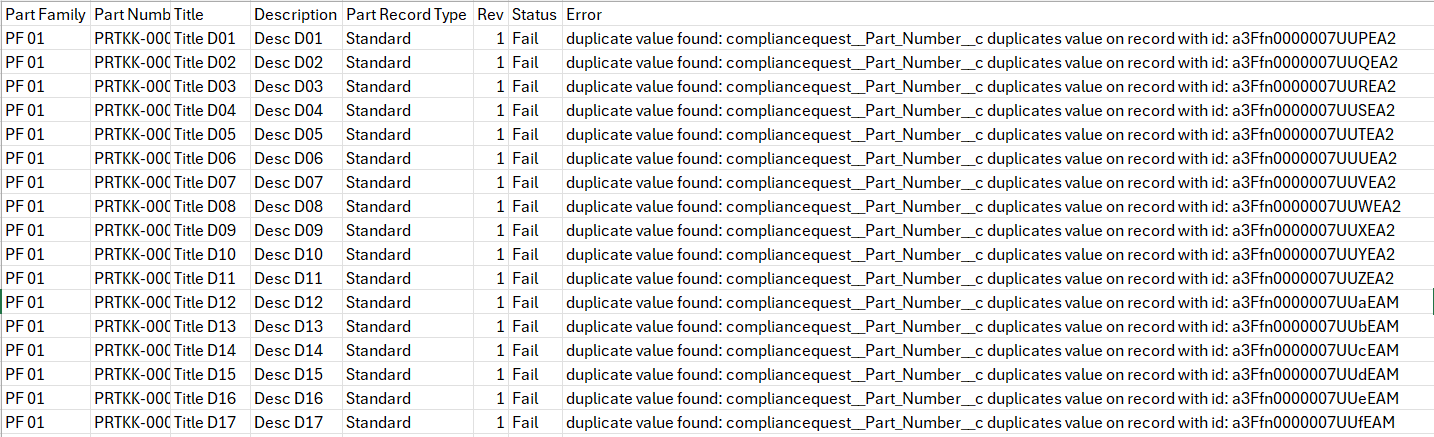
Download the Part Import Error File <yyyymmddhhmmss>.csv.
-
Open the Error file. The Error column lists the reason of error.
-
Click the Done to return to the Parts tab.
Example
Expected Outcome
-
Parts that did not Import are identified.
-
The Error details are listed.
Troubleshooting
Additional Resources
ComplianceQuest
-
Reprocess
We Value Your Feedback
To provide feedback or suggestions to improve the help content on this page click here.