
Purpose
As a Part Creator, you can create Standard Parts to establish a controlled item with defined attributes, classifications, and approved data needed for production use.
Prerequisites
Installation Package: CQ Core, CQ PLM Extension
Product: ProductQuest
Function: Standard Parts
User Profile: Standard User
Permissions: CQ Base User PSG and CQ PLM Creator PSG
Configurations: Part Families
Steps
-
Open the Parts tab. Then click New.
-
Select Record Type: Standard Part. Then click Next.
-
Specify this information:
-
Part Number
Specify the part number or leave as AUTO if autonumbering is enabled. -
Title
Specify the title. It cannot exceed sixty (60) characters. -
Part Description
Provide a description. -
Part Family
Specify the part family. -
Part Risk Level
Specify the part risk level from 1-5: 1 being the highest risk and 5 being the lowest risk.
-
-
Click Save. To create a new Standard Part, click Save & New.
Example
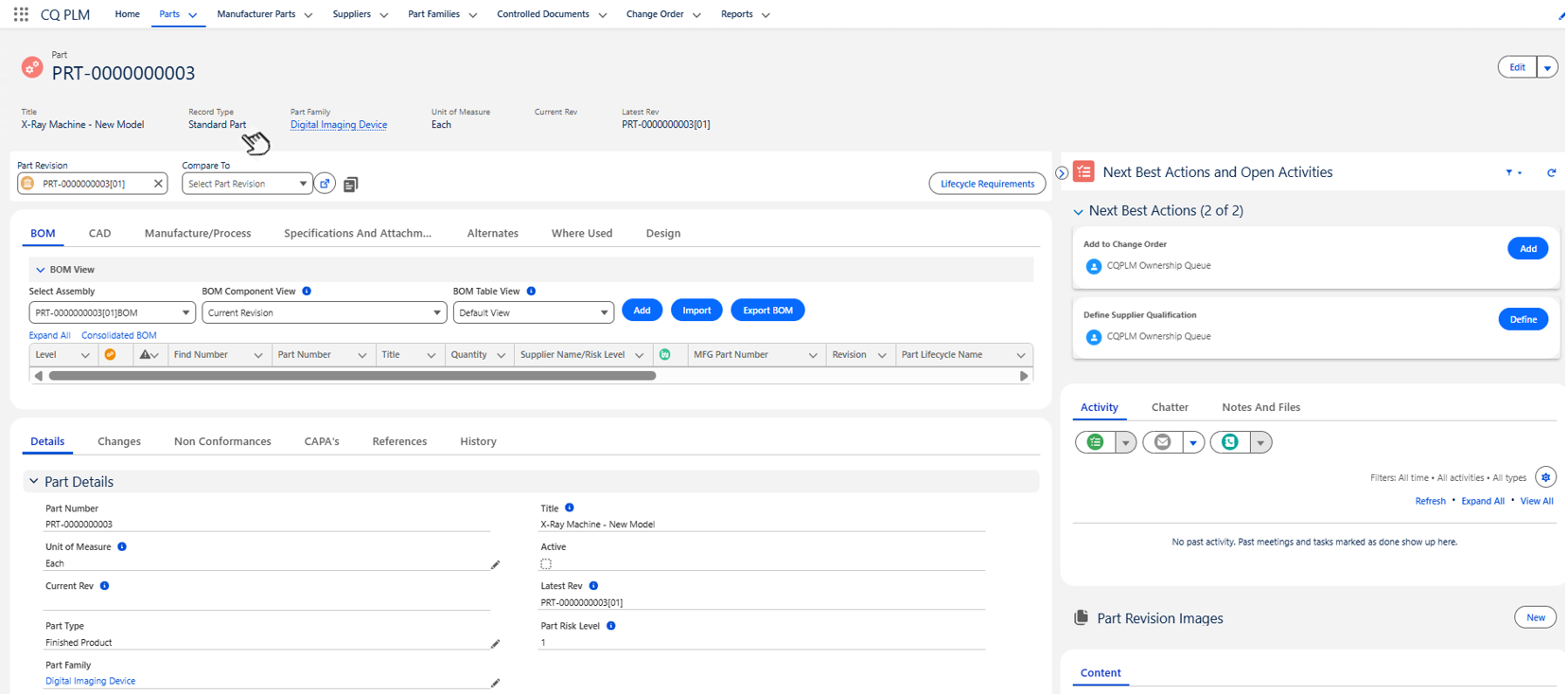

Expected Outcome
-
The Standard Part is created and assigned a unique number.
-
The Record Type is set to Standard Part.
-
The Standard Part is added to the CQPLM Ownership Queue.
-
The Lifecycle Name is set to Prototype and the Lifecycle Type is set to Pre-Production.
-
A Primary Controlled Document is created.
Optional Configurations
-
Part Lifecycles
Additional Resources
ComplianceQuest
We Value Your Feedback
To provide feedback or suggestions to improve the help content on this page click here.