
Purpose
As a Part Creator, you can identify the Next Level Part Number and the Top Level Part Number that uses a specific Part. In addition, you can identify a Primary Part to which an Alternate Part is linked. This supports accurate impact analysis before you update or modify a Part.
Prerequisites
Installation Package: CQ Core, CQ PLM Extension
Product: ProductQuest
Function: Parts
User Profile: Standard User
Permissions: CQ Base User PSG and CQ PLM Creator PSG
Record: Part record must exist
Steps
-
Open the Part record.
-
Select the Part Revision, if applicable.
-
Open the Where Used tab.
Example
Expected Outcome
-
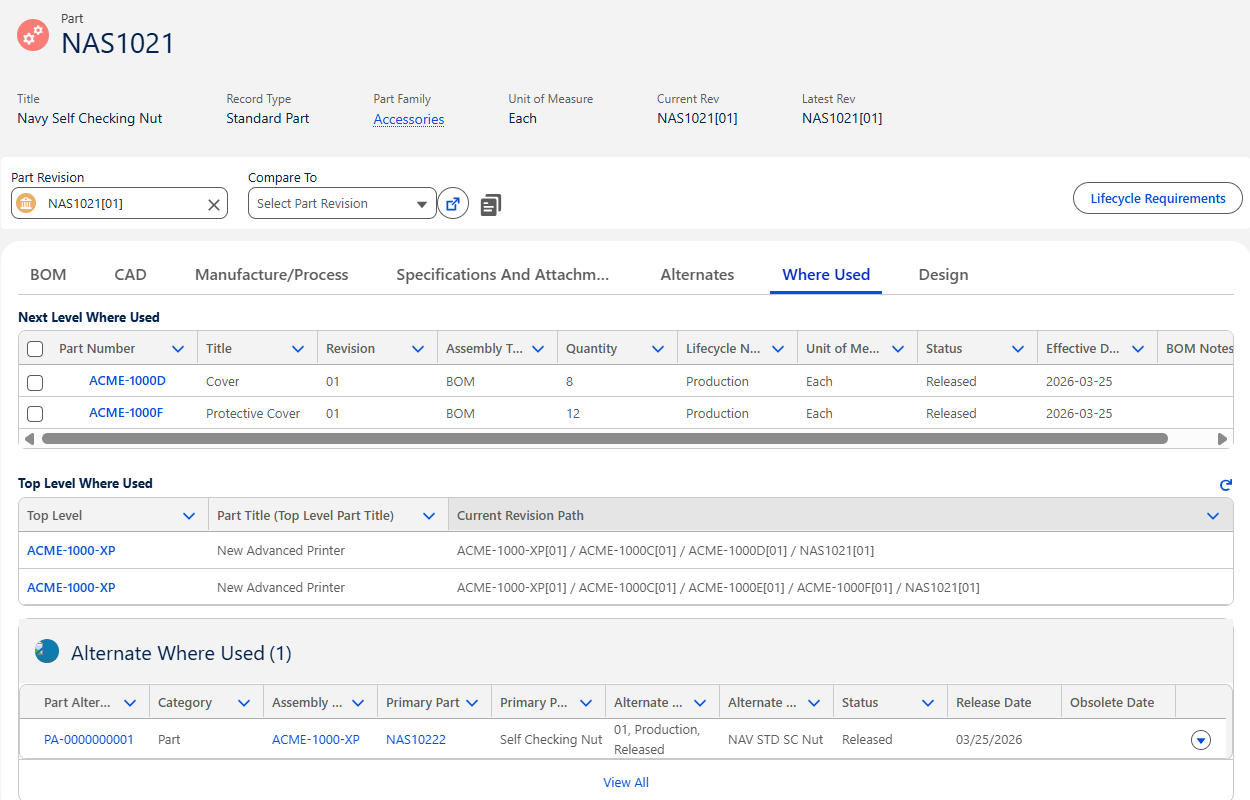
Each Next Level Part Number is displayed in the Next Level Where Used section.
-
Each Top Level Part Number along with Current Revision Path is displayed in the Top Level Where Used section.
-
The Primary Part Number linked to an Alternate Part Number is displayed in the Alternate Where Used section.
Additional Resources
ComplianceQuest
-
Part Creation
We Value Your Feedback
To provide feedback or suggestions to improve the help content on this page click here.