
Overview
Document Owners can pick up and perform scheduled periodic reviews for Controlled Documents in CQ. Periodic reviews are essential for verifying the continued effectiveness and relevance of documents, ensuring compliance with organizational and regulatory standards.
As part of the review process, Document Owners assess whether the document remains valid and assign a decision of Continue Use if it is determined that the document is still effective. This helps maintain document integrity and ensures that only accurate and approved information is available for use.
Prerequisites
Available in: Controlled Documents
Installed Package: CQ Core - Winter 2025
Optional Extension Packages: CQ Forms, CQ Laboratory Issues, CQ Process, and CQ EHS - Winter 2025
User Profile: Standard User
Permissions: CQ Base User PSG and CQ Document Owner PSG
Document Status: Draft, Pre-release, or Current
Instructions
-
From the Controlled Document record, select the Review option from the Action Menu.
-
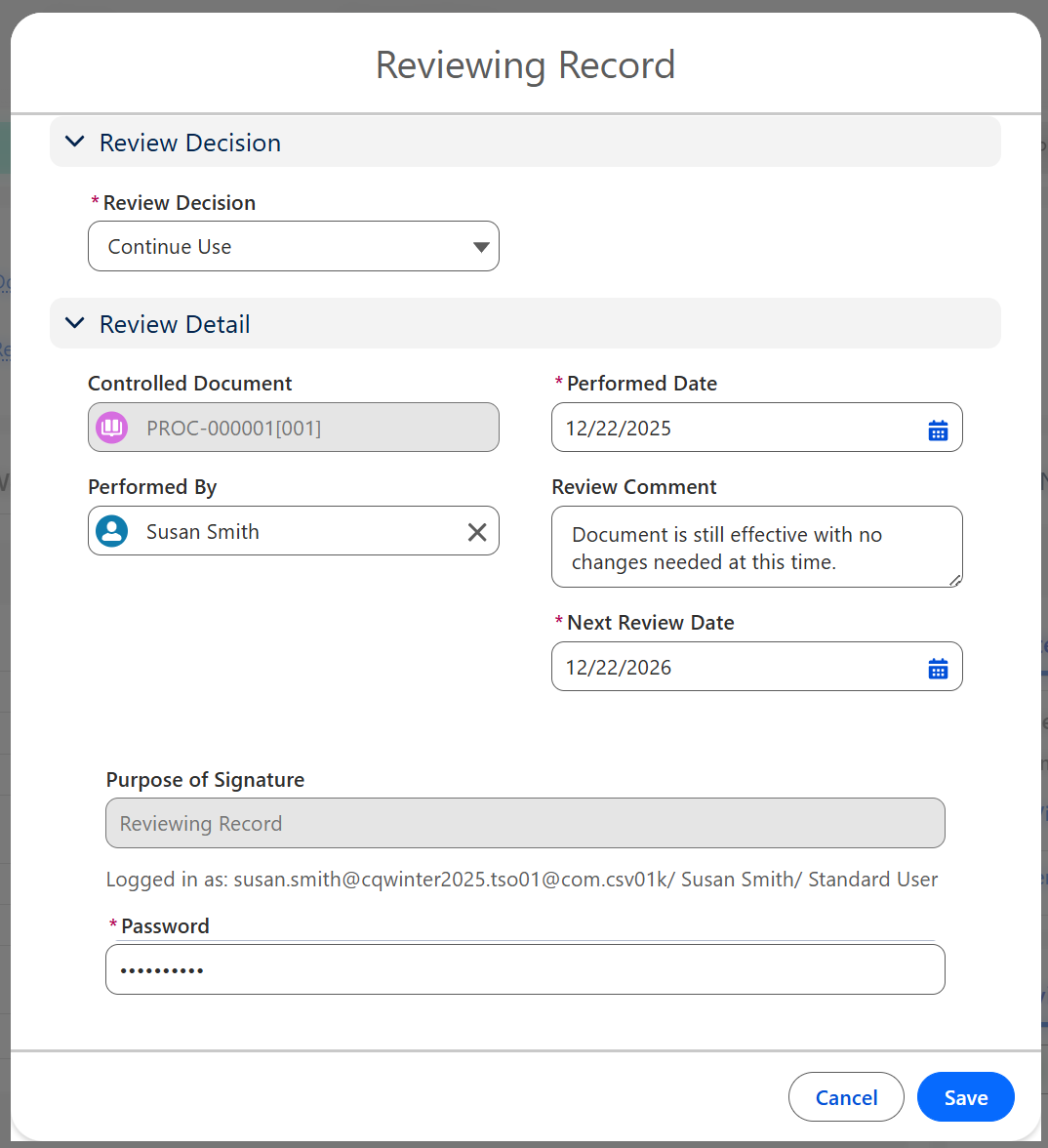
Select Continue Use from the Review Decision.
-
Enter Next Review Date, Review Comment, and any other relevant information.
-
Enter Comment and Password if required for eSignature Policies.
-
Click the Save button.
-
Verify new Target Review Date under Document Reviews.
Related List Quick Links


Results
-
The Document remains in the Status of Current.
-
The Review is saved and listed under the Document Reviews Quick Link.
-
The new Target Review Date is also displayed under the Training and Review Policy section under the Details tab.
Troubleshooting
-
Check back for new articles
Additional Resources
CQ Resources
-
Performing Document Reviews for New Revision
-
Performing Document Reviews for Retirement
Summer 2026