
Overview
Design Outputs represent the results of the design and development process, capturing the specifications, documents, and materials that define how the product or system will be realized. In ComplianceQuest, the Design Outputs section within the Design File record is used to document and manage these deliverables, ensuring that all outputs are clearly defined, traceable, and aligned with the corresponding design inputs and requirements. Enter and track the title, description, and status of each design output. Attach relevant files and controlled documents to provide supporting evidence and details. Maintain version control and a clear history of changes for each output. Ensure that outputs meet the intended requirements and are ready for verification and validation activities.
By systematically managing Design Outputs, organizations can ensure compliance with regulatory standards, facilitate effective communication among team members, and support the successful transfer of the design to manufacturing or further development stages.
Prerequisites
Available in: CQ Design
Installed Package(s): CQ Core, CQ Design Extension & CQ Process Extension - Winter 2025
Optional Extension Packages: myCQ & CQ PLM- Winter 2025
User Profile: Standard User
Permissions: CQ Base User PSG, CQ Design Owner PSG, and CQ Design Team Member PSG
Instructions
-
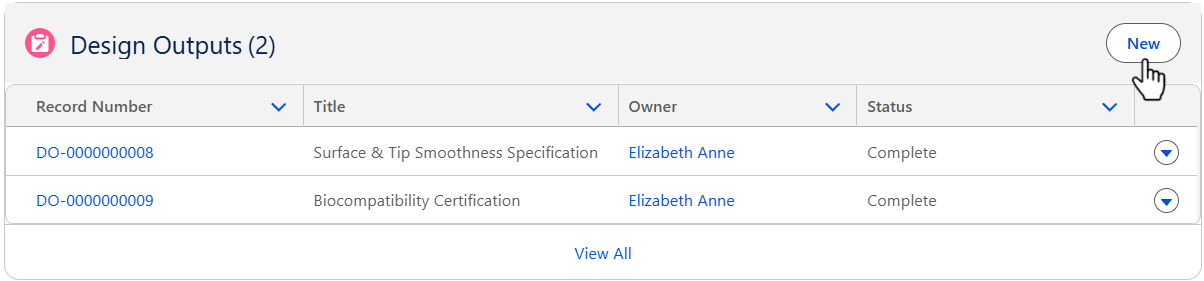
From the Design File record, Development tab, Design Outputs section, click the New button.
-
See the Creating Design Outputs section for the reference to create the Design Requirements.
Results
-
The Design Outputs are added to the Design File record.
-
Edit and Delete options are available from the drop-down arrow at the end of each Design Output row.
-
Click View All to see all Design Outputs.
Troubleshooting
-
Check back for new articles