
Purpose
As a Project Owner, you define the required workflow policies and approval steps for each Design Project Stage so the project follows the correct approval path before the work progresses.
Prerequisites
Installation Package: CQ Core, CQ Design Extension, CQ Management Review Dashboard Extension
Product: ProductQuest
Function: Design Projects
User Profile: Standard User
Permissions: CQ Base User PSG, CQ Design Owner PSG
Design Project Record Status: Draft
Steps
-
Open the Design Project record.
-
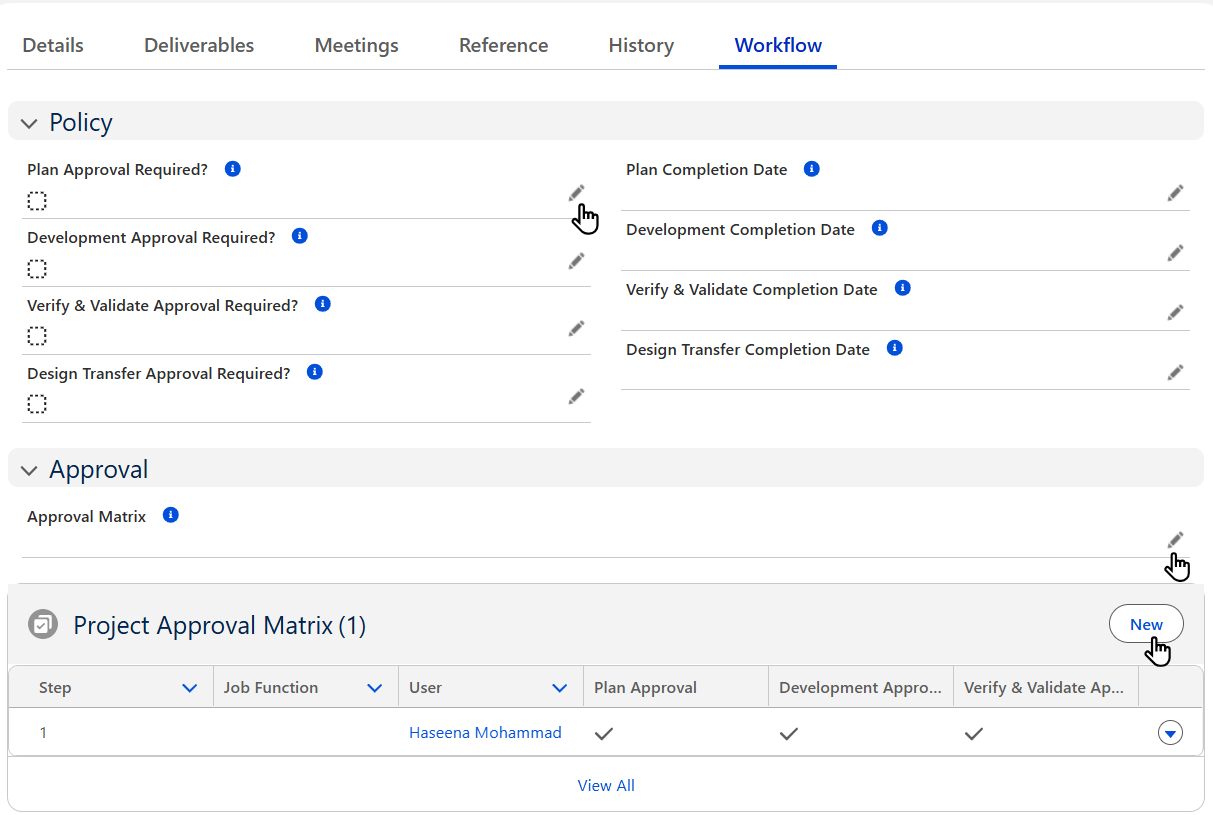
Open the Workflow tab. Then open the Policy section to edit a field or select the Stage that requires Approval.
-
If applicable, select the Approval Matrix to be used for this Project.
-
Click New to add individual Approvers.
-
Click Save. To add another Project Approval, click Save & New.
Example
Expected Outcome
-
Approval Policies are set for Project Stages.
-
Approvers are assigned as needed.
Optional Configurations
Additional Resources
ComplianceQuest
We Value Your Feedback
To provide feedback or suggestions to improve the help content on this page click here.