
Purpose
As a myCQ User, you can create a structured Nonconformance using AI‑extracted 5W2H details to start a department‑aligned workflow.
Prerequisites
Installed Package(s): CQ Core, CQ.AI Extension
Product: QualityQuest, Platform & Technology
Function: CQ.AI Agent
User Profile: Standard User
Permissions: CQ Base User PSG, CQ NC Owner PSG, CQ Design Owner PSG, Prompt Template User, Data Cloud User, CQSS AI User PSG
Steps
-
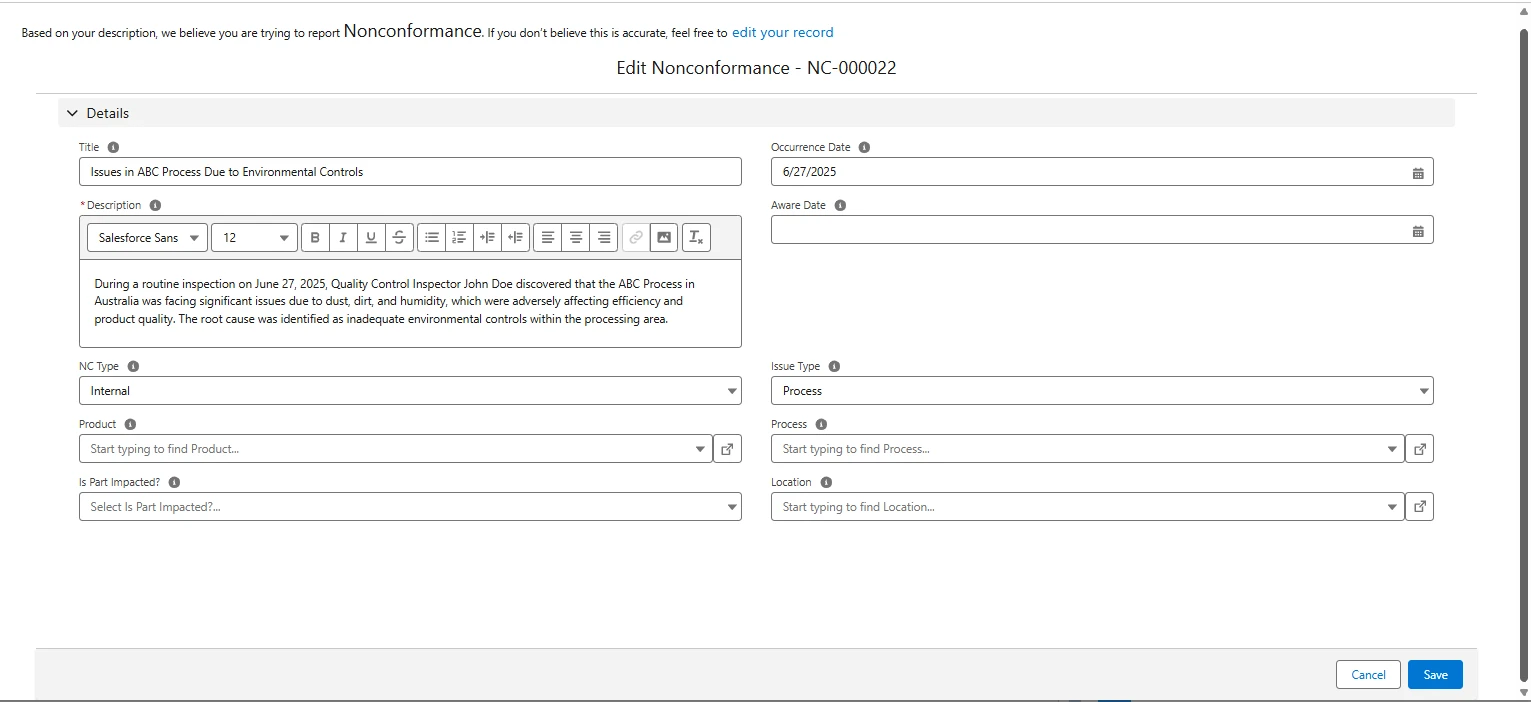
From the 5W2H Classification section, click Next.
Example:
-
Review the Title and update it if needed.
-
Review and update Description, NC Type, and Product.
-
(Optional) Review and update:
-
Process
-
Occurrence Date
-
Aware Date
-
Is Part Impacted?
-
Location
-
Account
-
Supplier
-
External Contact
-
Failure Code
-
-
(Optional) Upload related files.
-
Click Create Record.
Expected Outcome
-
Fields populate only when 5W2H details match the issue description.
-
All fields remain editable.
-
A new Nonconformance record is created with a unique NC number.
-
Ownership moves to the appropriate Department Nonconformance Queue.
-
The record appears in Draft status in the Triage stage.
-
The record appears in Recently Created Issues.
-
Queue members receive an email notification.
Additional Resources
ComplianceQuest
We Value Your Feedback
To provide feedback or suggestions to improve the help content on this page click here.