
Purpose
As a Record Owner, you close a complaint after verifying that all required tasks, reviews, and investigation activities are complete. You confirm the information is accurate and record the closure so the complaint exits the workflow.
Prerequisites
Installation Package: CQ Core, CQ Regulatory Reports Extension, CQ AS2 Gateway Extension, myCQ Extension, and CQ AI Extension
Product: QualityQuest and Platform Apps
Function: CQ Complaint Closure
User Profile: Standard User
Permissions: CQ Base User PSG, CQ Complaint Non DT Task Assignee PSG
Steps
Complaints can be closed under the Draft, Triage, In Progress, Verification, and/or Closure Rejected Stages.
-
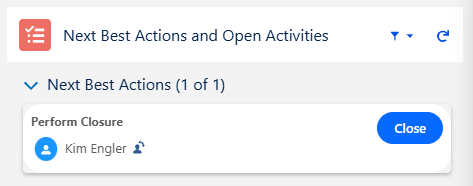
From the Complaint record, under Next Best Actions, click the Close action button or select the Close option from the Action menu.
-
Select the Resolution from the picklist option (i.e., Void, Complaint, Duplicate, Inquiry, Feedback).
-
Select the Conclusion from the picklist option.
-
Optionally, check the Require Closure Review if the Closure Reviewer approval is needed.
-
Select the Complaint Reviewer in the Closure Review By (Required, if the Require Closure Review is checked).
-
Enter Comment and Password if needed, and click the Save button
Example:
Expected Outcome
Require Closure Review Checked
-
The Complaint record moves to the Closure Review Stage.
-
An email is sent to the Closure Reviewer notifying the assignment of the Complaint for review.
-
The Submitting Complaint for Closure Approval activity is logged in the Complaint Record Activities section under the History tab.
-
Under Next Best Actions and Open Activities, in the Perform Review section, the Approve and Reject buttons are enabled for the Complaint Reviewer. The Closure Reviewer is listed as the Owner of Complaint Review Approval, and the Change Owner icon is available.
-
For completing the Closure Review, see Completing Closure Reviews.
Require Closure Review Unchecked
-
The Complaint record moves to the Closed Status and Closed Stage.
-
The Closing Complaint activity is logged in the Complaint Record Activities section under the History tab.
-
The Resolution is set as selected.
Additional Resources
ComplianceQuest
We Value Your Feedback
To provide feedback or suggestions to improve the help content on this page click here.