
Adding Assignable Causes
For Permission Set Groups: CQ Base User PSG and CQ NC Owner PSG
The NC Owner needs verify Defect/Failures entered during NC Intake to indicate if there is at this time any Assignable Cause that can be linked to the Product and/or Process Failure Code(s).
-
From the Nonconformance record, Details tab, Defect/Failure section, click the Edit Quick Action for the associated Defect Number.

-
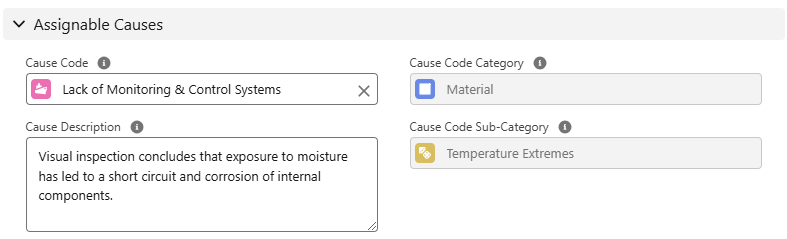
Select the standardized Cause Code from the Assignable Causes section.
All Cause Codes listed in CQ will display at this time, no matter what Defect/Failure is listed.
-
Cause Code Category and Cause Code Sub-Category will automatically display for the Cause Code selected above.
-
Optionally, enter the Cause Description.
-
Click the Save button.
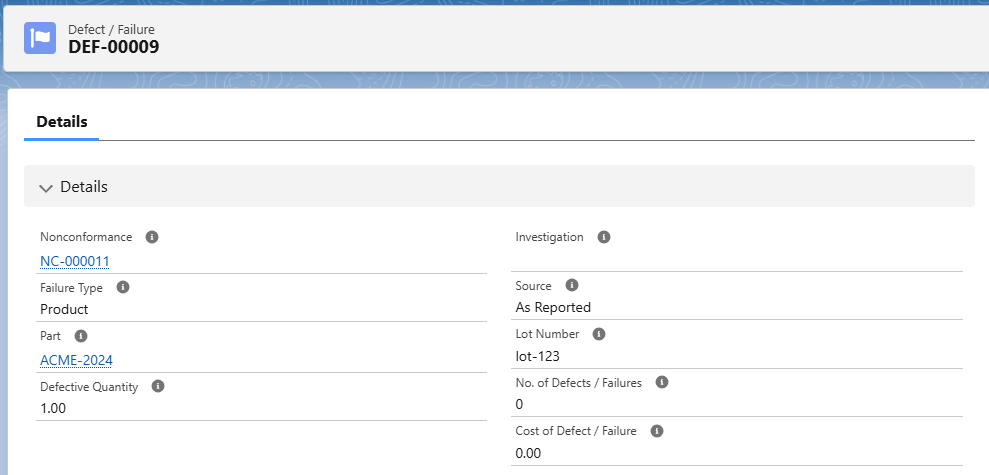
Results
-
The Assignable Cause has been added to the Defect/Failure.
-
The Source field under Defect/Failure Details as shown above indicates As Reported under the Defect/Failure Details.
-
If an NC Investigation is later performed and the Defect/Failure and Cause Codes are updated for any reason or new Defects found, the Investigator will be able to add a new Defect/Failure to indicate formal results of the Failure and Cause which will reflect a Source of As Investigated with a link to the Investigation record that would later be attached to the NC record.
-
See Performing NC Investigations for more information.