
Purpose
As a myCQ User, you can create a Nonconformance (NC) using the CQ AI Assistant to pre‑populate the 5W2H fields from an issue description.
Prerequisites
Installed Package(s): CQ Core, CQ.AI Extension
Product: QualityQuest, Platform & Technology
Function: CQ.AI Agent
User Profile: Standard User
Steps
-
Open Nonconformance from the App Launcher.
-
If not visible, select it from More.
-
-
Select Report NC from the Action Menu.
-
Enter the issue description.
-
Click Next.
-
Click Next again.
-
Review the populated fields.
-
Click Save.
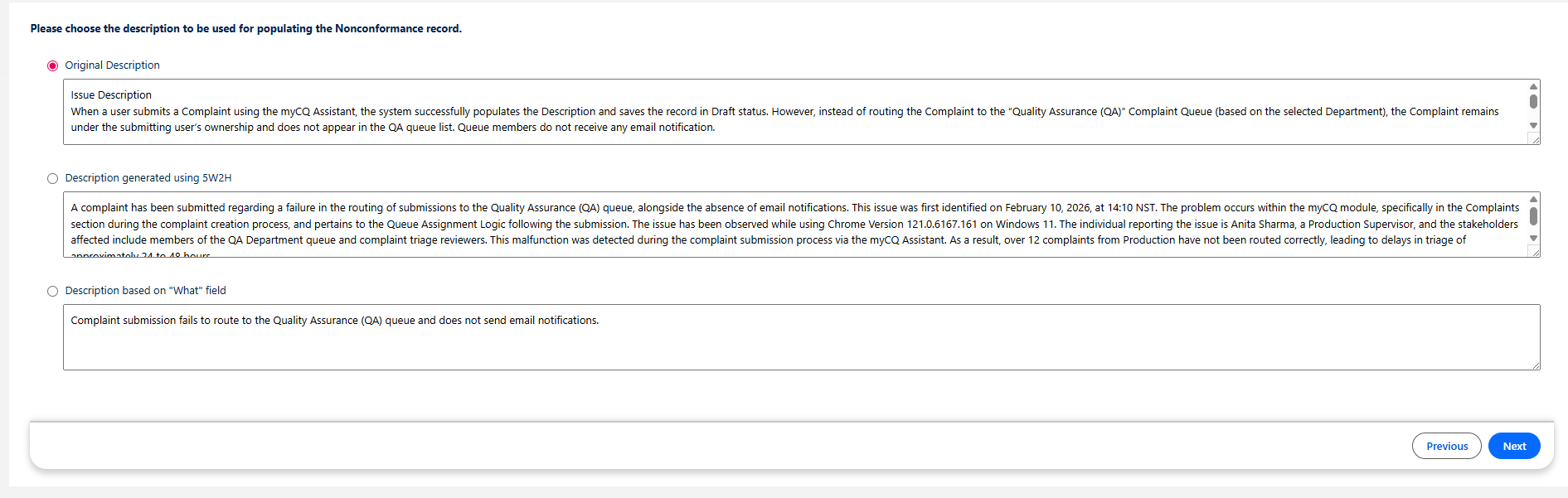
Example:
-
Click Save.
Expected Outcome
-
The CQ AI Assistant analyzes the issue description.
-
Matching 5W2H fields populate automatically.
-
Fields without matching details remain blank.
-
If What cannot be determined, a description of no more than 12 words is generated.
-
All 5W2H fields remain editable.
-
Next becomes available to continue.
-
Previous allows navigation to earlier steps.
We Value Your Feedback
To provide feedback or suggestions to improve the help content on this page click here.