
Purpose
As a Part Creator, you can view the Consolidated BOM to see the total quantity of all parts in a multilevel BOM and the quantity of any individual Part. This provides quick and accurate visibility of Part counts when managing inventories.
Prerequisites
Installation Package: CQ Core, CQ PLM Extension
User Profile: Standard User
Product: ProductQuest
Function: Parts
Permissions: CQ Base User PSG, CQ PLM Creator PSG, CQ Design Owner PSG
Steps
-
Open the Part record.
-
Select the Part Revision in the Part Revision field.
-
Click Consolidate BOM in the BOM View section (Note: click Back to Standard BOM View to go back to standard view).
Example
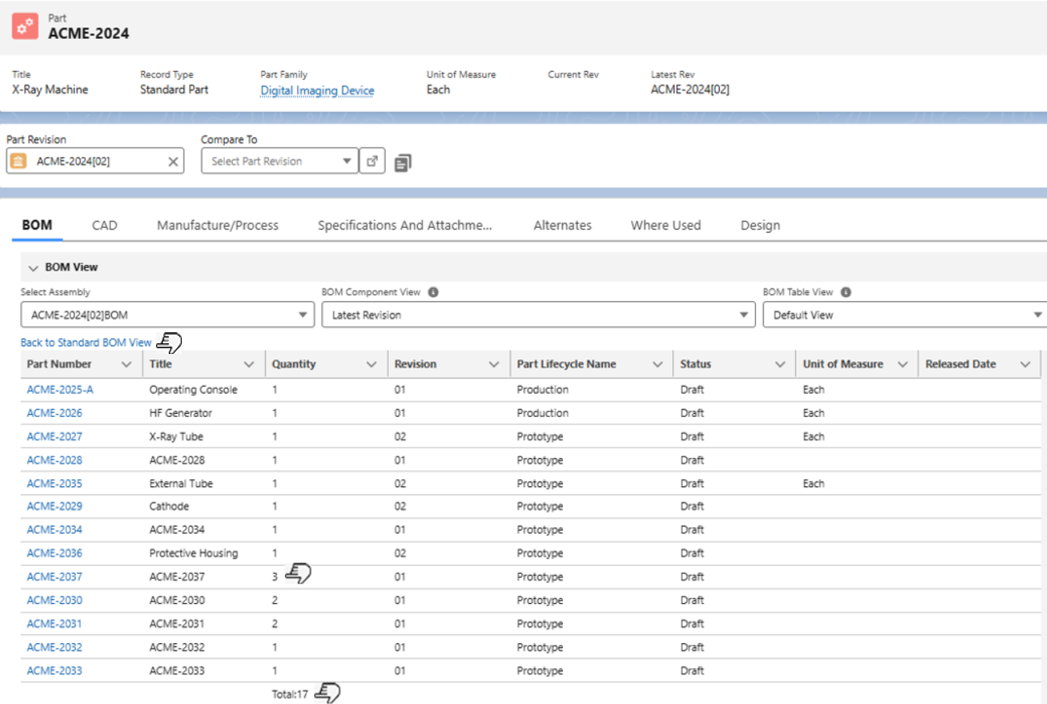
Expected Outcome
-
Total quantity of all Parts used in a BOM is displayed.
-
Total quantity of a specific Part used in a BOM is displayed.
Additional Resources
ComplianceQuest
-
Adding Parts in BOM
We Value Your Feedback
To provide feedback or suggestions to improve the help content on this page click here.