
Purpose
As a Document Viewer, you can access documents to read the current version and confirm the information you need without editing the content or changing the document’s status.
Prerequisites
Installation Package: CQ Core
Product: QualityQuest
Function: Controlled Documents, Template Documents
User Profile: Standard User
Permissions: CQ Base User PSG and CQ Document Viewer PSG
Record Status: Pre-Release, Current, Pre-Expire
Steps
-
Open the CQ Documents tab.
-
Access Document using Folder options:
-
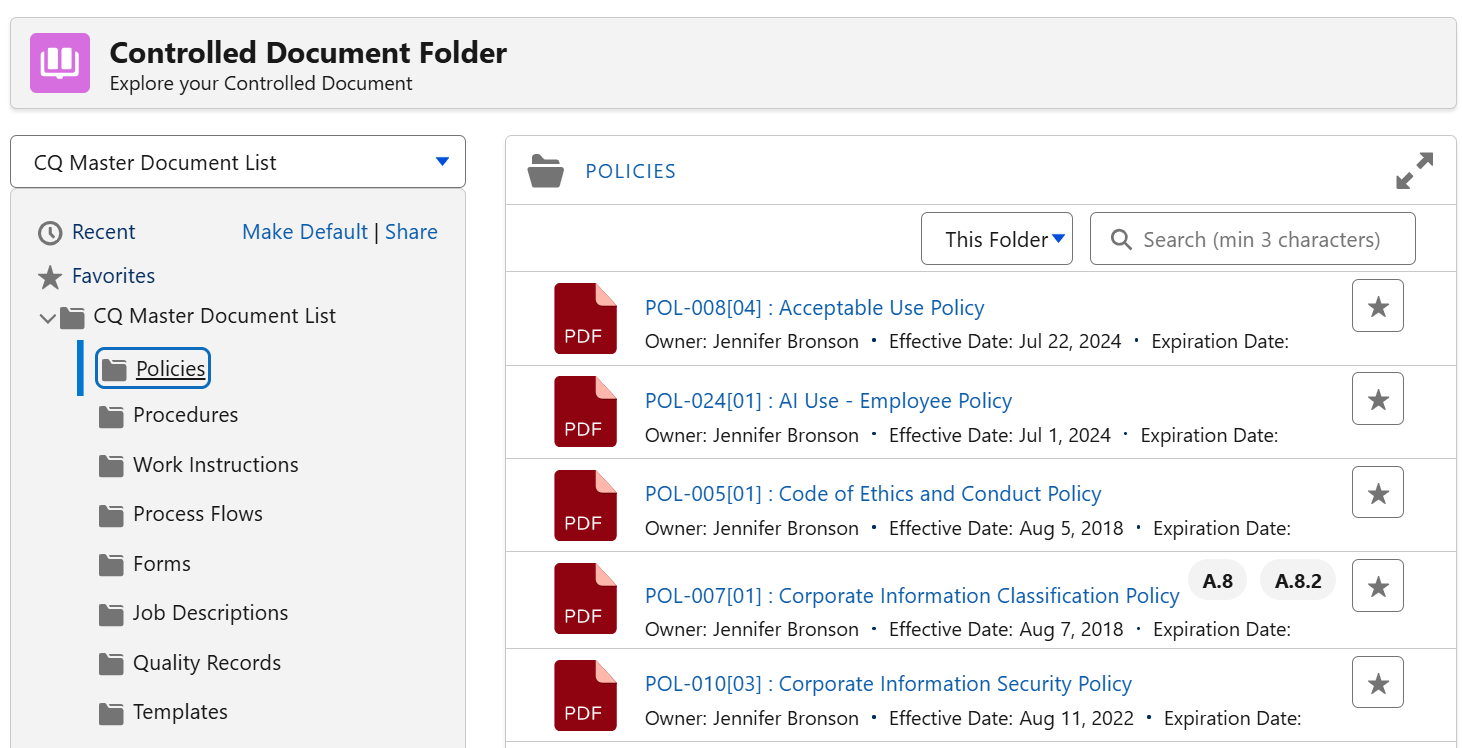
Documents By Category
Select the appropriate Document Folder to view various user-defined. -
Make Default
Click to save the folder view for future reference. -
Share
Click to copy the link to clipboard. -
Folders
Click to display list of documents by folder. -
Document Number: Title
Click to view the document file
-
Example
Expected Outcome
-
The Controlled Document Folder interface is displayed.
Optional Configurations
-
Document Binders
-
myCQ
Additional Resources
ComplianceQuest
-
Signing Off as Trainee for Document Training
-
Accessing Documents as Owners
We Value Your Feedback
To provide feedback or suggestions to improve the help content on this page click here.