
Purpose
As a Part Creator, you can compare Part Revisions to review changes across iterations and confirm that updates align with current design and specification requirements. This supports consistent Part definition across revisions.
Prerequisites
Installation Package: CQ Core, CQ PLM Extension
Product: ProductQuest
Function: Parts
User Profile: Standard User
Permissions: CQ Base User PSG and CQ PLM Creator PSG
Record: Part Revisions must exist
Steps
-
Open the Part record.
-
Select the Part Revision.
-
Select Part Revision to Compare To.
-
Click Compare.
Example
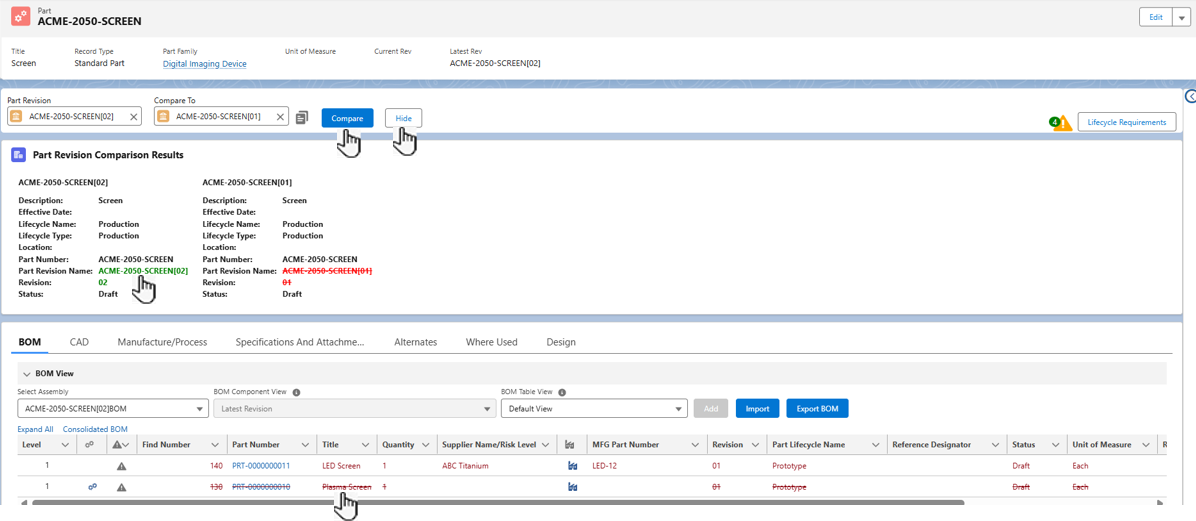
Expected Outcome
-
Green text in the new Part Revision shows the newly updated values.
-
Red struck‑through text in the old Part Revision shows the removed values.
-
Black text in both revisions show values that did not change.
-
Blank fields in both revisions show empty values in both versions.
-
A Find Number in Red in the BOM shows an item added in the Latest Revision (Level 1 only).
-
A Red struck‑through Find Number in the BOM shows an item removed from the latest revision (Level 1 only).
-
You can hide the Part Revision Comparison Results by selecting Hide.
Additional Resources
ComplianceQuest
-
Resolving Lifecycle Requirements
-
Creating Part Revisions
-
Deleting Part Revisions
We Value Your Feedback
To provide feedback or suggestions to improve the help content on this page click here.