
Purpose
As a Record Owner, you use CQ.AI to find Similar Nonconformances (NCs) based on the details of the current record. You review the suggested NCs to identify related issues, reuse relevant information, and support consistent evaluation and decision‑making.
Prerequisites
Installation Package: CQ Core, myCQ Extension, CQ Supplier Central, CQ Supplier Performance, CQ Ratings Framework, CQ Embedded Analytics, and CQ AI Extension
Product: QualityQuest and Platform Apps
Function: CQ AI Similar NC Discovery
User Profile: Standard User
For Permission Set: CQSS Similarity User, CQSS AI Assistant User
For Permission Set Groups: CQ Base User PSG, CQ NC Owner PSG
Steps
-
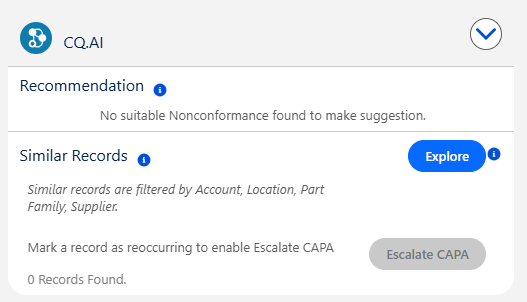
From the Nonconformance record, expand the CQ.AI section.
-
See CQ End User Guide - Similarity and Recommendation for more information.
Example:
Expected Outcome
-
You view similar nonconformances so you can compare related issues and use the information to support evaluation.
Additional Resources
ComplianceQuest
We Value Your Feedback
To provide feedback or suggestions to improve the help content on this page click here.