
As an Investigator, you can generate and update Investigation Summaries using Agentforce. This task ensures you create structured summaries that align with organizational requirements for Nonconformance and CAPA investigations.
Prerequisites
Installed Package(s): CQ Core, CQ.AI Extension
Product: QualityQuest, Platform & Technology
Function: CQ.AI Agents
User Profile: Standard User
Permissions: CQ Base User PSG, CQ NC Owner, CQ EA PSG, CQSS AI User PSG
Steps
Notes
-
Generate the Investigation Summary only for CAPA records escalated from a Nonconformance with Promote NC Investigation to CAPA selected.
-
Generate the Investigation Summary in all Investigation Statuses except Void.
-
Update the Investigation Summary only when the Investigation Status is Draft or Open.
-
Use the CQ Investigation Assistant on the Nonconformance, Investigation, or CAPA record page.
-
Use the assistant on other pages by entering the record ID.
-
Update the Investigation only with edit access.
-
Ensure Agentforce is active.
Notes
-
Enter requests in your own words.
-
Ensure the wording conveys the same intent.
-
Use sample phrases only as examples.
-
Expect differences between sample phrases and the text entered in the application.
-
From the Nonconformance or CAPA record, select the Agentforce icon in the top navigation bar. In the dropdown, select CQ Investigation Assistant.
-
Select Show More in the chat window to expand the conversation.
-
Enter “Provide Investigation Summary” in the chat window.
-
Enter “update the summary” to save the newly generated summary.
-
Enter “Don’t update the summary” to keep the existing summary.
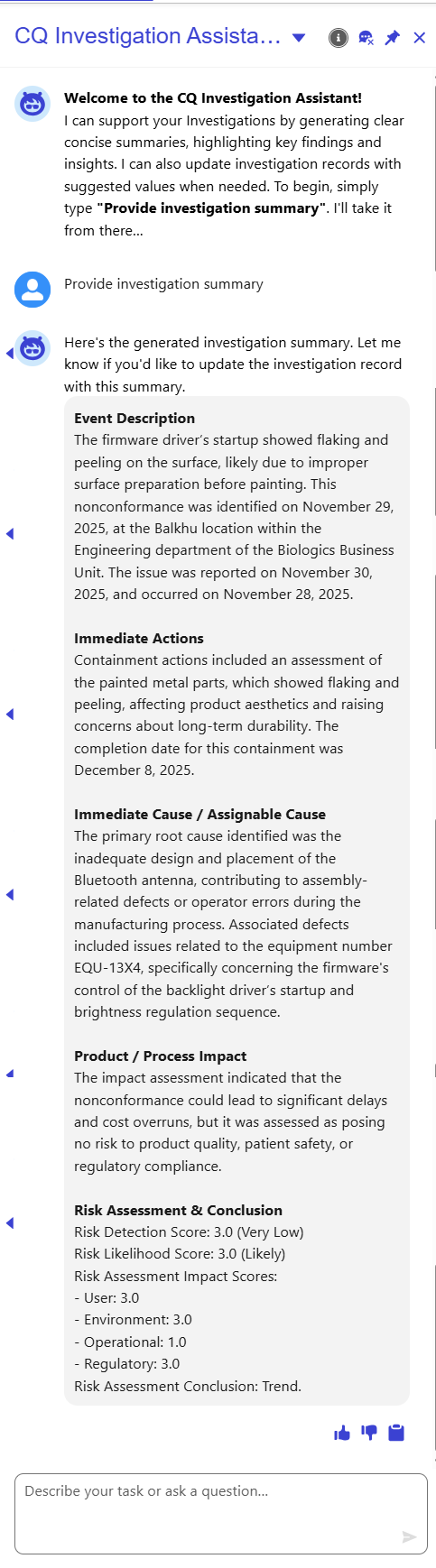
Example of Summary Results of Nonconformance Investigation:
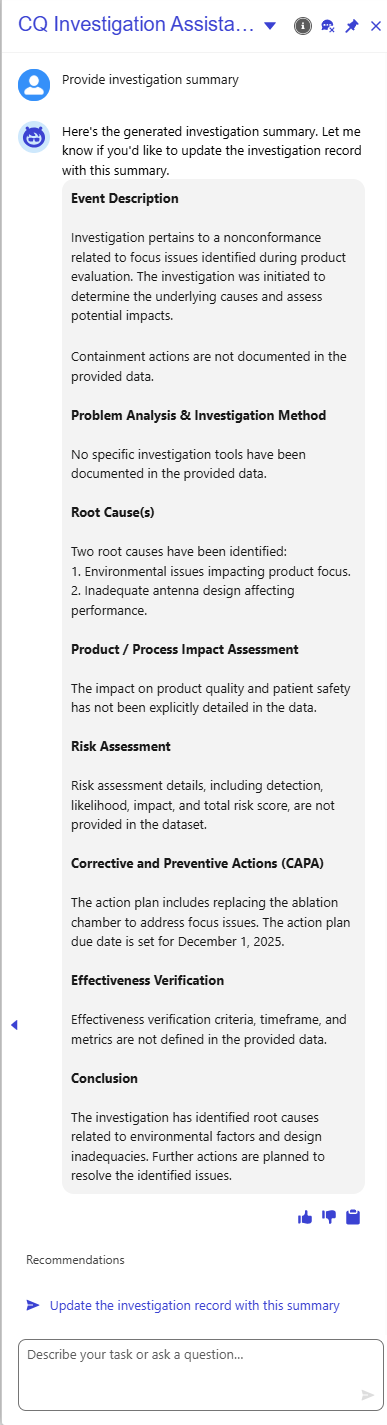
Example of Summary Results of CAPA Investigation:
Expected Outcome
-
You receive a generated Nonconformance Investigation Summary that includes:
-
Event Description
-
Immediate Actions
-
Immediate Cause / Assignable Cause
-
Product/Process Impact
-
Risk Assessment and Conclusion
-
-
You receive a generated CAPA Investigation Summary that includes:
-
Event Description
-
Immediate Actions/Containment
-
Problem Analysis and Investigation Method
-
Root Cause(s)
-
Product/Process Impact Assessment
-
Risk Assessment
-
Corrective and Preventive Actions
-
Effectiveness Verification
-
Conclusion
-
-
You receive a prompt to confirm whether to update the summary.
-
You can revise the summary directly in the record.
-
Upon confirmation, the Investigation Summary field updates and displays a confirmation message.
-
A confirmation card appears showing the Investigation Number, Source, Investigation Owner, and a summary snippet.
We Value Your Feedback
To provide feedback or suggestions to improve the help content on this page click here.