
Purpose
As a Record Owner, you update defects or failures to revise the issues identified during the investigation. You adjust the recorded defect information and save the changes so the complaint reflects the most current investigation findings.
Prerequisites
Installation Package: CQ Core, myCQ Extension, CQ Supplier Central, CQ Supplier Performance, CQ Ratings Framework, CQ Embedded Analytics, and CQ AI Extension
Product: QualityQuest and Platform Apps
Function: CQ Defect/Failure Update
User Profile: Standard User
For Permission Set Groups: CQ Base User PSG, CQ NC Owner PSG
Steps
-
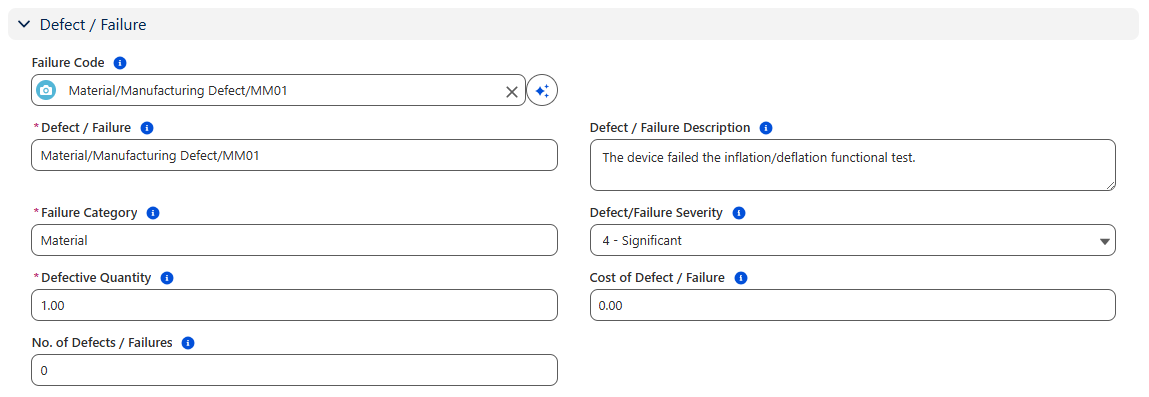
Optionally, select a pre-defined Failure Code or, enter a Defect/Failure.
-
If a pre-defined Failure Code is selected, the system will autopopulate a Defect/Failure, Failure Category, and Defect/Failure Severity.
-
If a pre-defined Failure Code does not exist for the nonconformity, enter a Defect/Failure, Failure Category, and select a Defect/Failure Severity.
-
Optionally, enter a Defect/Failure Description.
-
Select a Failure Category if a new Defect/Failure is entered. This identifies the category of the failure that is found.
-
Select a Defect/Description if a new Defect/Failure is entered. This identifies the degree of impact of the failure.
-
Enter the Defective Quantity. This is the total quantity for defects identified.
-
Optionally, enter the Cost of Defect/Failure. This indicates the cost incurred as a result of the defect.
-
Enter the No. of Defects. If one part is found defective, how many defects were found on that part?
Example:
Expected Outcome
You update the defects or failures so the record reflects the most current investigation findings.
Additional Resources
ComplianceQuest
We Value Your Feedback
To provide feedback or suggestions to improve the help content on this page click here.