
Overview
Users with the appropriate permissions can view the content of obsolete Controlled Documents in CQ. Although these documents are no longer active for operational use, access to their content may be necessary for historical reference, audits, or compliance purposes.
By following the steps outlined in this guide, authorized users will learn how to locate and view obsolete document content while ensuring that access remains controlled and compliant with organizational policies.
Prerequisites
Available in: Controlled Documents, Template Documents, and Courses
Installed Package: CQ Core - Winter 2025
User Profile: Standard User
Permissions: CQ Base User PSG, CQ Document Owner PSG, and CQ Document Obsolete Content Access
Document Status: Obsolete
Instructions
-
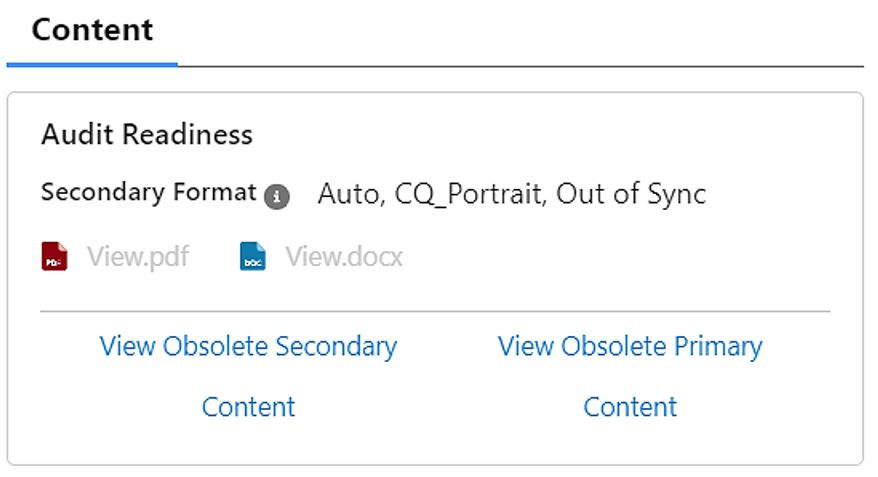
From the Controlled Document record, click the View Obsolete Content For Primary or Secondary under the Content section.
-
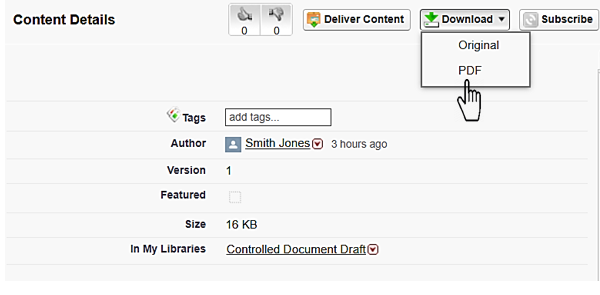
Select the Download option to select Original or PDF.
Results
-
If the Obsolete Primary and Secondary Content are in PDF format, then the Preview window displays the PDF, from which the Viewer can download the document.
-
If the Obsolete Primary Content is Original, then the document will be downloaded.
-
The actions available in the viewer include Zoom, Search, Download, Highlight, Draw, Eraser, Text, Read Aloud, Print, Save, and Close.
Troubleshooting
-
Check back for new articles
Additional Resources
CQ Resources
-
Document Retirement
Summer 2026