
Overview
Approvals are a critical step in ensuring compliance, accuracy, and proper authorization within the CQ system. By following these instructions, users will learn how to access pending approvals, review record details, and take appropriate actions such as Approve, Reject, or Reassign to maintain workflow integrity.
Prerequisites
Available in: All Records with Approvals
Installed Package: CQ Approval - Winter 2025
User Profile: Standard User
Permissions: CQ Base User PSG and CQ Record Approver PSG (Record Owners can also Approve)
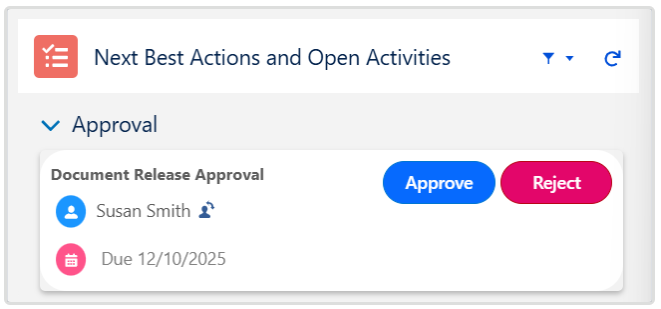
Next Best Action: Review, Approve, Reject buttons are displayed for appropriate record Stage/Status
Email Notification: Approval notification is available in Approver’s Inbox
Instructions
-
From the Home tab select the Approve/Reject link for the CQ Record to review for Approval.

-
Review the information needing Approval from the record.
-
See Comparing Documents for Approval for more information.
-
From Next Best Actions, click the Approve or Reject button as needed.
-
Enter Comment and Password if required for eSignature Policies.
-
Complete the transaction.

Results
Record Approved
-
The CQ Record moves to the Approved Stage and Approved Status.
-
Once all Approvers have completed the approval process, the Record Owner should receive an email notification confirming that the Record has been approved.
-
The CQ Approval History section will display as Approved under the Approval Overall Status.
-
The Approving Record activity is logged in the Record Activities section under the History tab.
Record Rejected
-
Approval tasks are removed from ALL Approver's CQ Items under the Home tab.
-
The Record displays with an Approval Status of Rejected.
-
CQ Approval History displays with an Overall Status of Rejected.
-
An email is sent to the Record Owner notifying them that the record has been Rejected.
-
The Rejecting Record activity is logged in the Record Activities section under the History tab.
-
The Submit for Approval button is enabled once again in the record.
Troubleshooting
-
Check back for new articles
Additional Resources
CQ Resources
-
Reassigning Approvers
-
Comparing Documents for Approval
Summer 2026