
Overview
Tracking Field History in CQ provides visibility into changes made to record fields over time. This functionality helps maintain data integrity and accountability by capturing who made the change, when it occurred, and what values were updated.
By reviewing field history, users can monitor edits, support audit requirements, and ensure compliance with organizational and regulatory standards.
Prerequisites
Available in: All Records
Installed Package: All - Winter 2025
User Profile: Standard User
Permissions: CQ Base User PSG and CQ Record Owner PSG
Audit Trail: Must be enabled for the CQ Record. See Audit Trail.
Instructions
-
From the CQ record, select the View Field History action.

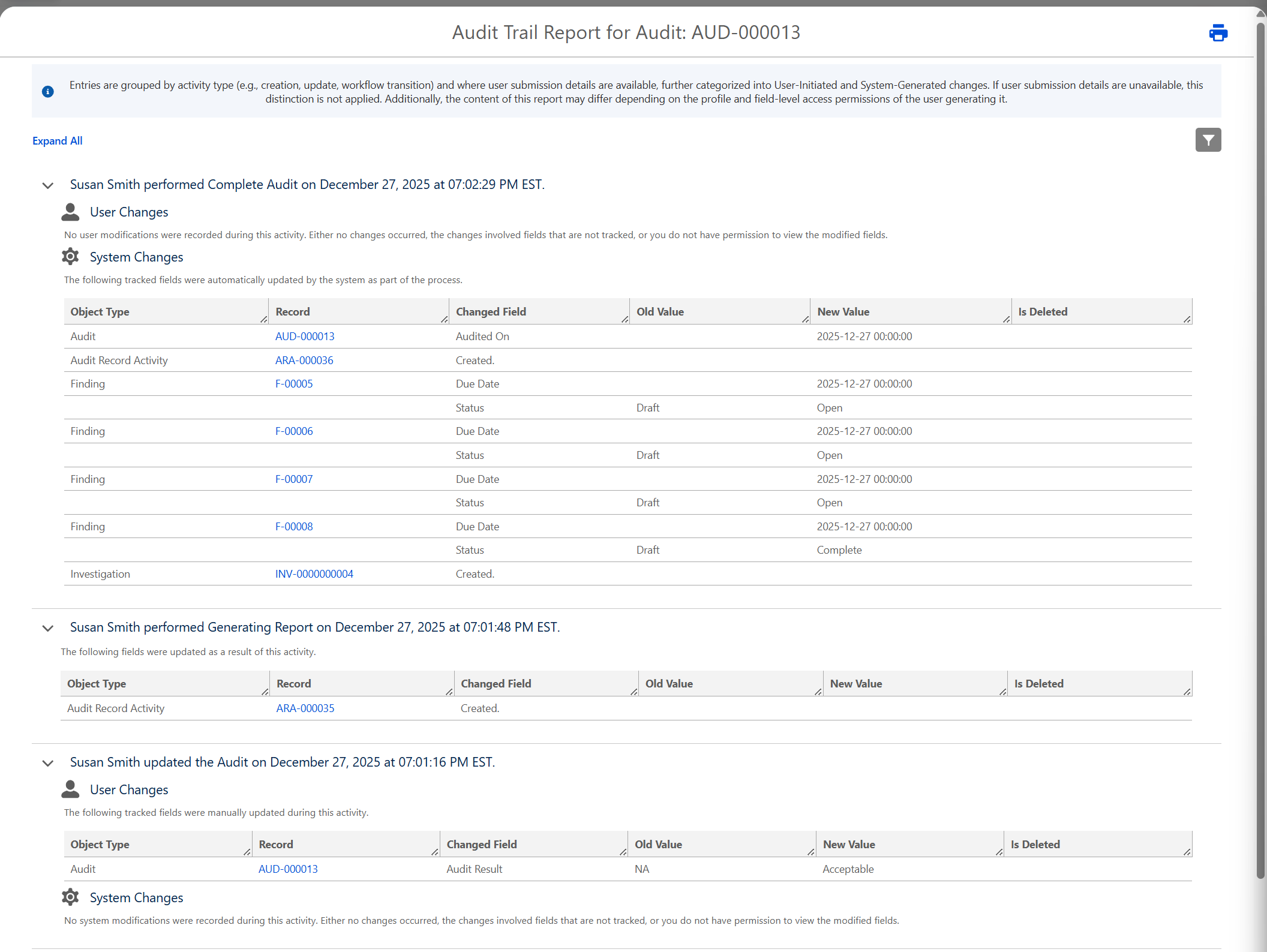
Example Field History for an Audit
-
Click the Print icon to print the history.
Results:
-
The Audit Trail Report is generated in read-only format.
Troubleshooting
-
Check back for new articles
Additional Resources
CQ Resources
-
Running Audit Trail Reports from the Admin Portal
Summer 2026