
Purpose
As a Part Creator, you can add the Manufacturer Name and Manufacturer Part Number to specify the exact component used in the Bill of Materials. This ensures accurate identification during procurement and prevents selection of incorrect or non‑compliant Parts.
Prerequisites
Installation Package: CQ Core, CQ PLM Extension
User Profile: Standard User
Product: ProductQuest
Function: Parts
Permissions: CQ Base User PSG, CQ PLM Creator PSG, CQ Design Owner PSG
Steps
-
Open the Part record.
-
Click New in the Part Qualifications section on the Manufacture/Process tab (Note: you can also click Define in the Next Best Actions and Open Activities section to define the Supplier Qualification).
-
Click New in the Part Qualifications section.
-
Specify this information:
-
Supplier
Select the Supplier. -
Manufacturing Part
Select the Manufacturing Part. -
Process
Select the Process. -
Receiving Inspection Process
Select the Receiving Inspection Process. -
Qualification Status
Qualification Status is set to Draft. If applicable, select other Qualification Status.
-
-
Click Save.
Example
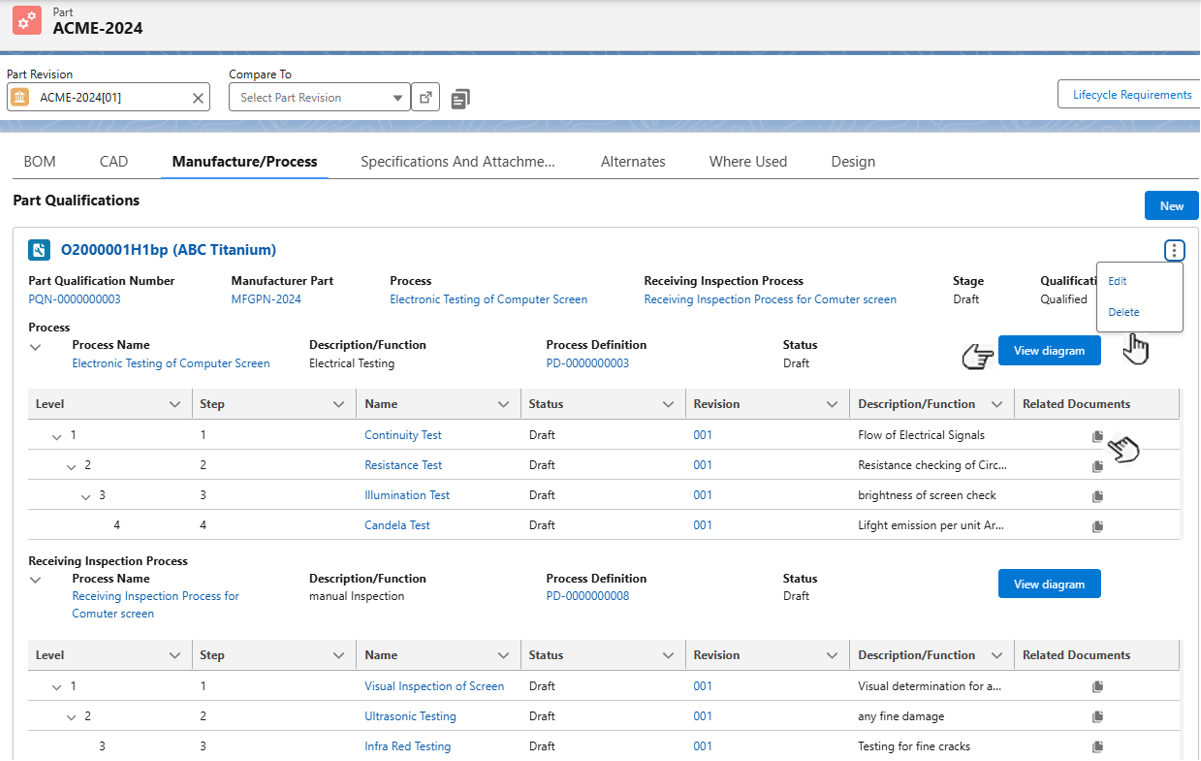
Expected Outcome
-
Part Qualifications record is created and assigned a unique number.
-
Supplier’s Name corresponding to the Supplier Number is added in the parenthesis.
-
The page shows 3 dots for Edit and Delete options.
-
View Diagram is added to open the Process Manager for viewing Process/Receiving Inspection Process diagram.
-
The Supplier Name/Risk Level is added in the BOM for the corresponding Part Number.
-
The Supplier icon is added in the BOM for the corresponding Part Number.
-
The Manufacturer Part Number is added in the BOM for the corresponding Part Number.
Additional Resources
ComplianceQuest
-
Operation & Operation Definitions
-
Process & Process Definitions
We Value Your Feedback
To provide feedback or suggestions to improve the help content on this page click here.