
Overview
Document Administrators can edit a Controlled Document directly from the document record in CQ without creating a formal Change Order or issuing a new revision. This method is intended for minor corrections, such as fixing typos, formatting issues, or other non-substantive errors in previously approved and released documents.
By using this approach, administrators can make quick updates without triggering a new revision or requiring retraining, ensuring that documents remain accurate and professional while maintaining compliance.
Prerequisites
Available in: Controlled Documents
Installed Package: CQ Core - Winter 2025
Optional Extension Packages: CQ Forms, CQ Laboratory Issues, CQ Process, and CQ EHS - Winter 2025
User Profile: Standard User
Permissions: CQ Base User PSG and CQ Document Admin PSG
Document Status: Draft, Pre-release, or Current
Instructions
-
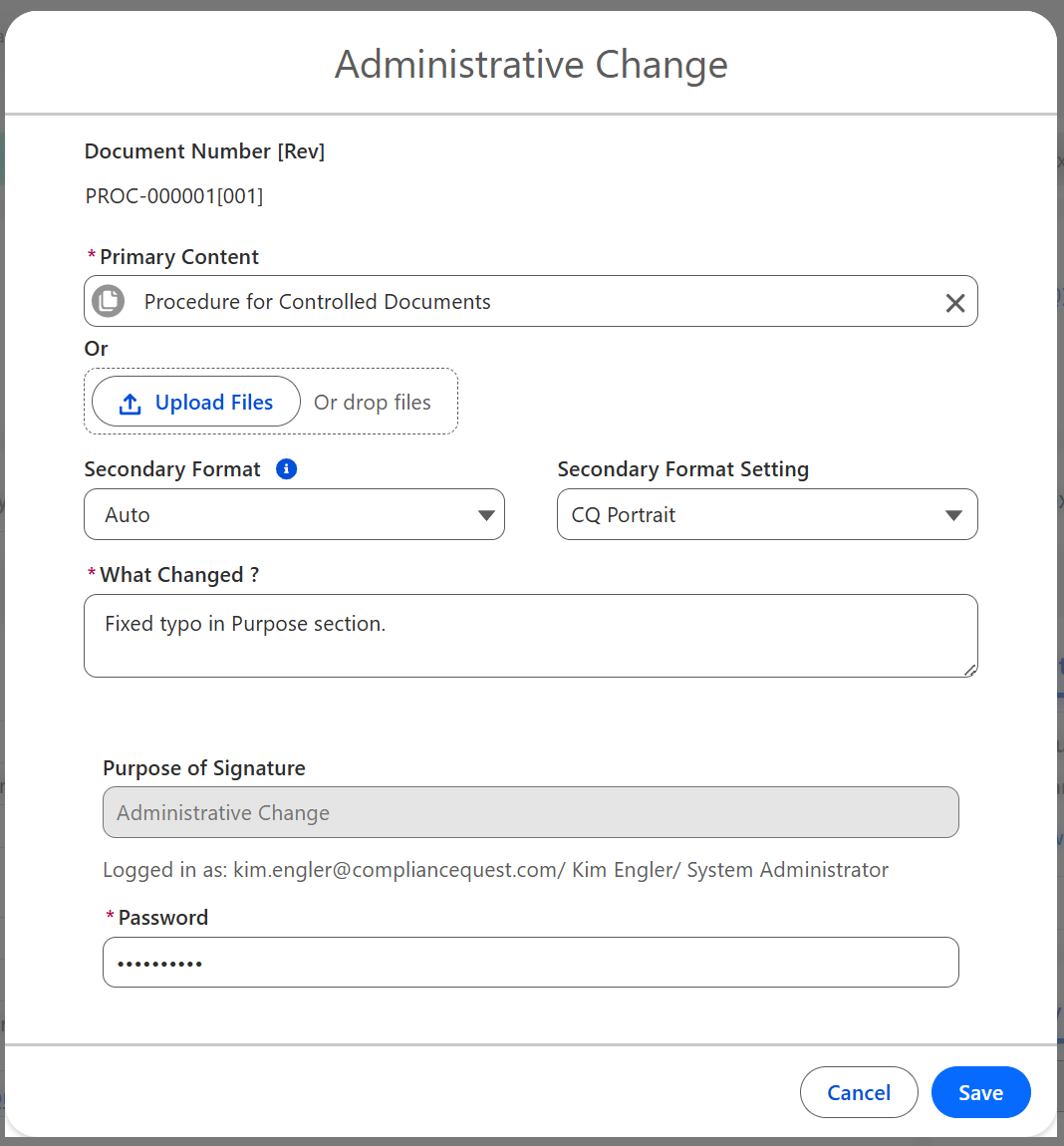
From the Controlled Document record, select the Admin Change option from the Action Menu.
-
The Primary Content defaults to the open record file. If applicable, Drop/Upload Files to replace the current file with a new version.
-
Optionally, select the Secondary Format option: Auto, Manual, or Disabled which will be used for the Controlled Document.
-
The Secondary Format Setting will display if Auto is selected. Update as needed.
-
Enter the description of What Changed?
-
Enter Comment and Password if required for eSignature Policies.
-
Click the Save button.
Results
-
The new version of the Controlled Document file has been uploaded.
-
The latest version and all previous Versions can be viewed at any time by clicking View File Details from the Document Preview Window and navigating to the Versions section.
-
Administrative Change activity is logged in the Controlled Document Record Activities section under the History tab.
Troubleshooting
-
Check back for new articles
Additional Resources
CQ Resources
-
Revising Document via Change Order
-
Revising Document via Controlled Document
Summer 2026