
Purpose
As a QMI Admin, you can rescore evaluation results to correct identified inaccuracies. This task ensures final evaluation scores remain accurate and is available only when the Scoring Status is Complete.
Notes:
-
If Scoring Status is Pending, this means that Scores have not yet been calculated. Batches run at regular intervals that will check for Scoring Statuses that are Pending. Once the Scoring is completed by the Batch Processor, the Scoring Status will change in the Scorecard from Pending to Report Generation Pending, and once the Scorecard is generated, it will move to Complete.
-
Scorecards that are not processed will be picked up during the next scheduled run. This ensures that all Scorecards are evaluated on time according to the predefined schedule.
Prerequisites
Installed Package(s): CQ Core, CQ QMI - Summer 2026
Product: Platform & Technology
Function: Rescoring Evaluations
User Profile: Standard User
Permissions: CQ Base User PSG and CQ QMI Manager PSG
Steps
-
Open the Rating Scorecard record.
-
In Next Best Actions, click Rescore or select Rescore from the Action Menu.
-
If eSig is enabled, review the Purpose of Signature.
-
Optionally, enter a Comment.
(This field may be required based on eSig Settings.) -
If eSig is enabled, enter your Password.
(User Name may display or be required based on eSig Settings.) -
Click Save.
Example:
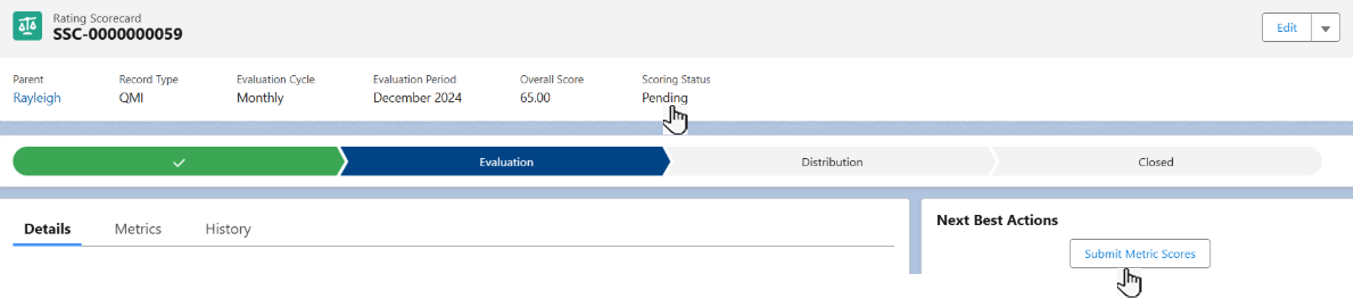
Expected Outcome
-
Scoring Status updates to Pending.
-
In the Details tab, under Review Information, Approval Status is blank.
-
Next Best Actions shows Submit Metric Scores (for approval).
Additional Resources
ComplianceQuest
We Value Your Feedback
To provide feedback or suggestions to improve the help content on this page click here.