
Audience
Standard User
Purpose
The purpose of the Location Name drop‑down filter is to allow users to view average metric cycle times specific to a selected location. By choosing a location from the drop‑down menu, the dashboard dynamically updates to display the corresponding average cycle time, enabling users to quickly analyze and compare location-based performance metrics.
Prerequisites
Installed Package(s): CQ QMI - Summer 2026
Product: CQ QMI
Function: Creating Rating Models
User Profile: Standard User
Permissions: CQ Base User PSG, CQ QMI Manager PSG
Steps
-
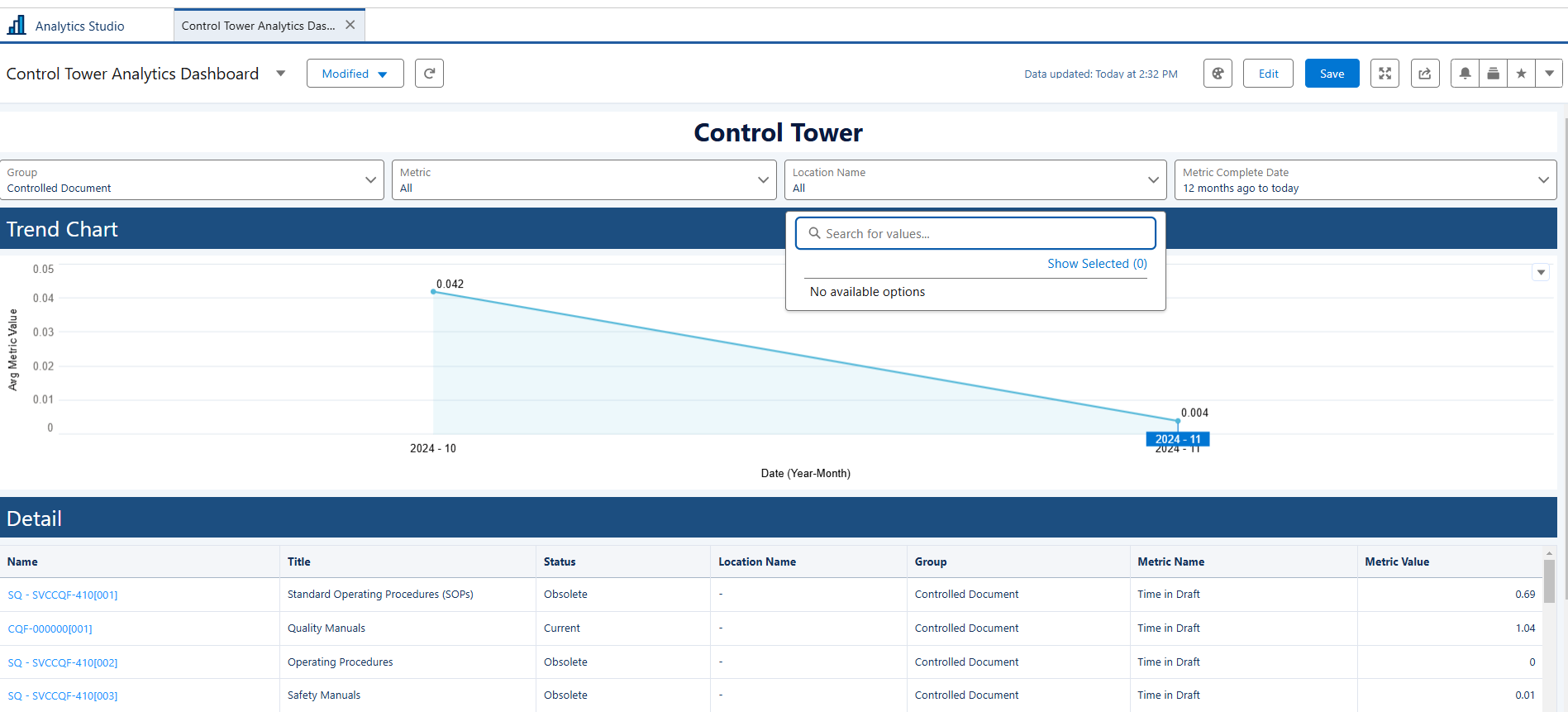
From the Control Tower Analytics Dashboard, click the Location Name drop-down arrow.
-
Select any of the applicable options.
Expected Outcome
-
The Trend Chart updates to display a line graph that illustrates how the average metric value for the selected Location Name changes over time.
-
The Detail section refreshes to show a list of all records associated with the selected location, allowing users to review specific data entries that contribute to the displayed trend.
Troubleshooting
Optional Configurations
Additional Resources
ComplianceQuest