
Purpose
As a Record Owner, you add NC containments to document the immediate actions taken to control a nonconformance. You record how the affected parts, lots, or processes were isolated or held so reviewers can understand how the issue was contained before evaluation continues.
Prerequisites
Installation Package: CQ Core, myCQ Extension, CQ Supplier Central, CQ Supplier Performance, CQ Ratings Framework, CQ Embedded Analytics, and CQ AI Extension
Product: QualityQuest and Platform Apps
Function: CQ NC Containment Addition
User Profile: Standard User
For Permission Set Groups: CQ Base User PSG, CQ NC Owner PSG
Steps
-
Containment Task(s) may also be created during NC Reporting and prior to completing Triage.
-
Containment can be preset to be required for all NCs related to a Product. See your CQ Administrator.
-
The Containment Policy can also be managed by the NC Owner from the Workflow tab.
-
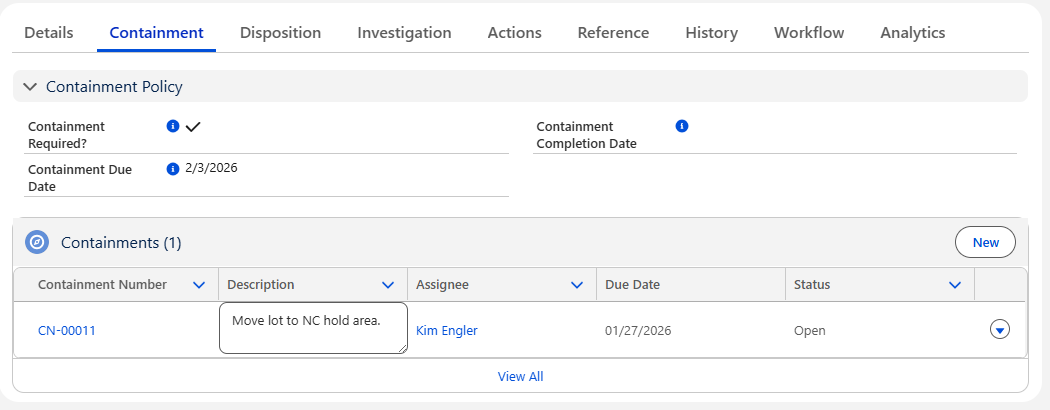
From the NC record, Containment tab, check the Containment Policy section to see if the Containment Required? checkbox is checked. If not, skip this section.
-
If assigned during NC creation, Containment tasks will be listed under the Containments section.
-
Click the New button to add additional Containment tasks.
-
Add the Containment Title, Due Date, Description, and Assignee.
-
Select if the Containment is Complete. If complete, select the Completion Date and optionally, add the Containment Summary.
-
Optionally, Drop/Upload Files associated with the Containment.
-
Click the Save button or Save & New for additional Containment tasks.
Example:
Expected Outcome
-
The Containment task has been added to the NC record.
-
If the Containment has been completed, it will display a Complete Status.
-
If the Containment has not been completed, it will display an Open Status and the Assignee will receive notification to complete the Containment.
-
An Activity is created and can be accessed by the Containment Assignee from the Home tab.
Additional Resources
ComplianceQuest
We Value Your Feedback
To provide feedback or suggestions to improve the help content on this page click here.