
Overview
Granting access to CQ records through manual sharing allows authorized users to provide specific individuals or groups with visibility and editing rights to a record outside of standard role-based permissions.
This feature ensures flexibility in collaboration while maintaining control over who can access sensitive information. Manual sharing is particularly useful for exceptional cases where additional stakeholders need temporary or extended access to support reviews, approvals, or other quality processes.
For example, the owner of a record wants to share a single case record with a coworker, because that coworker has experience resolving similar issues. The record owner creates a manual share that opens up access to only the one case record for their coworker (and users above the coworker in the role hierarchy). In this scenario, creating a manual share is easier and more secure than a sharing rule.
Prerequisites
Available in: All
Installed Package: All - Winter 2025
User Profile: Standard User
Permissions: CQ Base User PSG and CQ Record Owner PSG
Public Groups: Optional, see Public Groups
Instructions
-
From the CQ record, select Sharing from the Action menu.

-
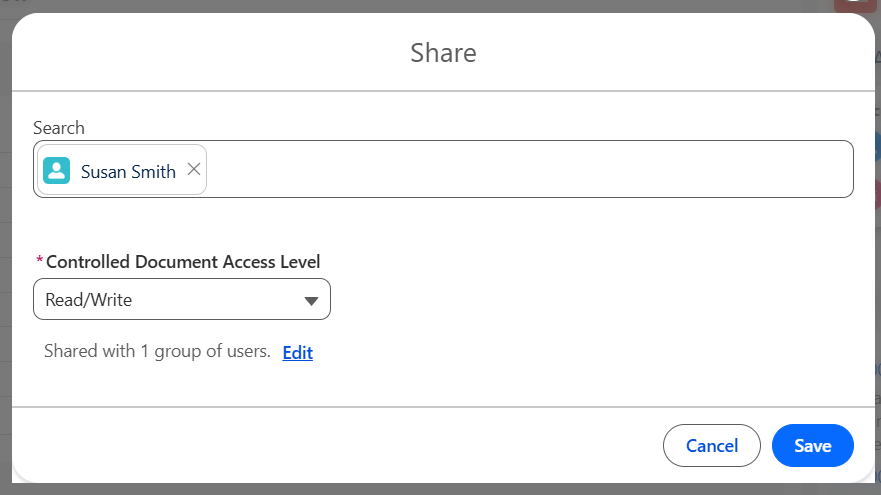
Select User or Public Group, then search and select the User or Public Group name for which the Record will be shared.
-
Select the Access Level to be granted: Read Only, or Read/Write.
-
Select the Edit link to modify any existing Sharing rules as needed.
-
Click the Save button.
Results
-
The record has been shared to users assigned.
Troubleshooting
-
Check back for new articles
Additional Resources
CQ Resources
-
Sharing Document Content for Collaboration
Salesforce Resources
Summer 2026