
Purpose
As an NC Owner, you can review similar Nonconformance records to identify reoccurrence and support consistent evaluation.
Prerequisites
Installed Package(s): CQ Core, CQ.AI Extension
Product: QualityQuest, Platform & Technology
Function: CQ.AI Agent
User Profile: Standard User
Permissions: CQ Base User PSG, CQ NC Owner PSG, and CQSS Similarity User
Steps
-
Open the Nonconformance record.
-
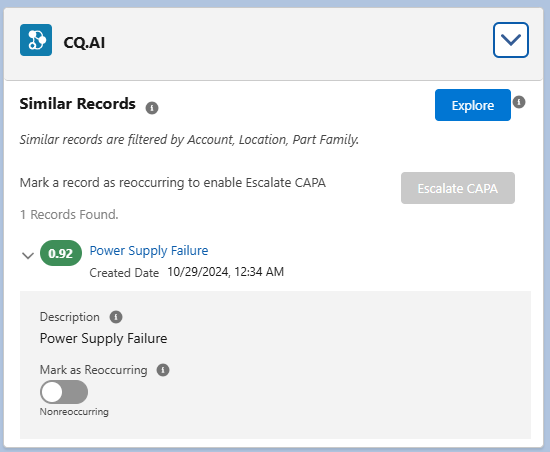
Expand the CQ.AI section.
Example:
-
Click Explore to view similar NC records.
To view similar NCs immediately after record creation, run SFDC_LOCAL (Connections) and AI CQSS NC Similar Records (Recipes) in Data Manager, or wait for the scheduled run.
Expected Outcome
-
Similar NCs appear in Similar Records and CQ.AI Similar NCs Explorer.
-
Results are ordered by:
-
Highest similarity score (0.6–1.0)
-
Creation date
-
-
Records in Void, Closed, or Duplicate status are excluded.
-
Results are filtered by Account, Location, Part Family, Supplier, and matching Product Family.
-
Location filtering refines matches using Location, Part Family, and description similarity.
-
You can download results as a CSV file named NCSimilarRecords.
-
Updated filters (Record Size, Minimum Score, From, To) refresh results when you select Search More.
-
Mark as Reoccurring links the existing NC as a reoccurrence.
-
Reoccurring NCs can be escalated using Escalate to CAPA.
Additional Resources
ComplianceQuest
We Value Your Feedback
To provide feedback or suggestions to improve the help content on this page click here.