
Overview
CQ automatically generates an Investigation when certain record types reach the Investigation Stage, ensuring that events requiring deeper analysis are managed with the appropriate rigor.
When any of these records progress into their Investigation Stage, the system automatically creates a linked Investigation to guide users through documenting failures, analyzing contributing factors, determining root cause, and defining the actions needed to address the issue.
Prerequisites
Available in: Audit Findings, CAPAs, Complaints, Nonconformances, Safety Incidents, Safety Observations
Installed Package: CQ Core, EHS - Winter 2025
User Profile: Standard User
Permissions: CQ Base User PSG, CQ Record Owner PSG and/or Task Assignee PSG
Next Best Action: Perform Investigation
Instructions
-
From the CQ record, click the Perform Investigation button.
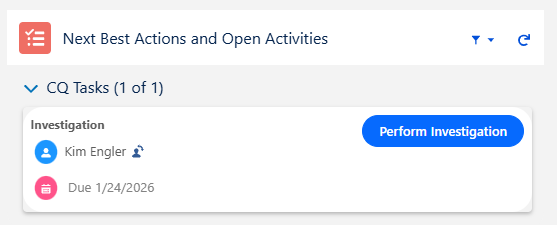
Example Complaint Investigation Form
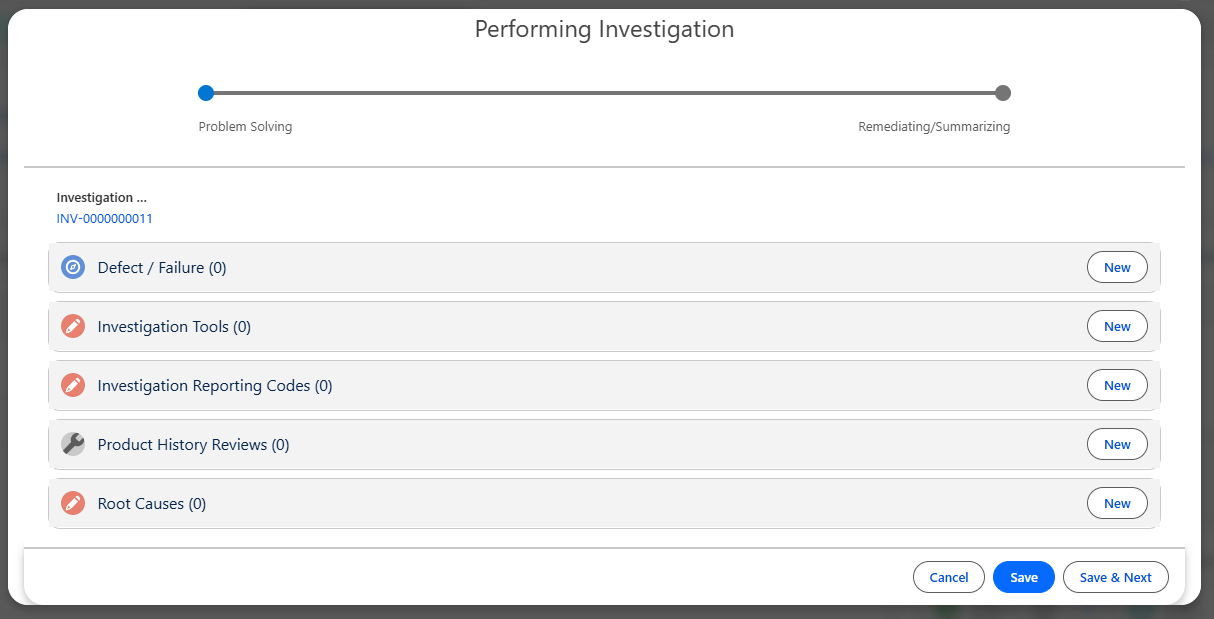
Results
-
The Performing Investigation window is prompted displaying next steps to complete the Investigation for each CQ record type.
Troubleshooting
-
Check back for new articles
Additional Resources
CQ Resources
-
Performing Audit Finding Investigations
-
Performing CAPA Investigations
-
Performing Complaint Investigations
-
Performing Nonconformance Investigations
-
Performing Safety Incident Investigations
-
Performing Safety Observation Investigations
-
Linking Investigation Tools
-
Adding Root Causes to Investigations
-
Adding Action Plans to Investigations
Summer 2026