
Purpose
As a QMI Manager, you can review and approve completed Rating Scorecards to confirm accuracy and compliance before finalization.
Note: If the User has QMI Admin permissions, then the Approval Matrix field will be available on the New Scorecard Review window, and the User will be able to add the Approval Matrix during the creation of Scorecard Review.
Prerequisites
Installed Package(s): CQ Core, CQ QMI- Summer 2026
Product: Platform & Technology
Function: Scorecard Reviews
User Profile: Standard User
Permissions: CQ Base User PSG and CQ QMI Manager PSG
Steps
-
Open the App Launcher.
-
Search for CQ QMI and open the app.
-
Select the Scorecard Reviews tab.
-
Select + New Scorecard Review from the drop-down or select New.
-
Select Record Type: QMI, then select Next.
-
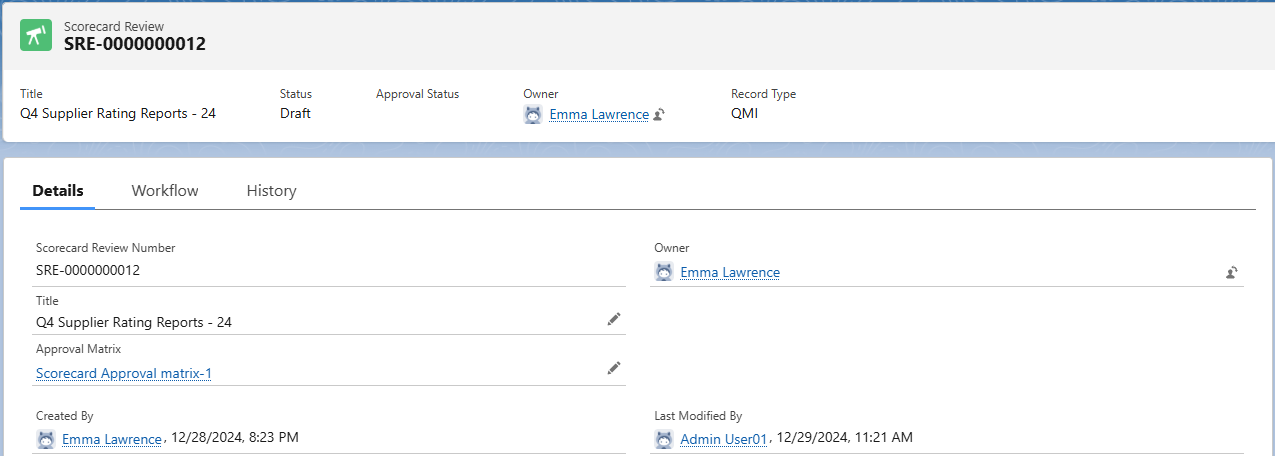
Review Scorecard Review Number.
(Read-only; assigned on save.) -
Review Owner.
(Read-only; defaults to the creator.) -
Enter the Title. (Required)
-
Optionally, select an Approval Matrix.
-
Select Save or Save & New.
Example:
Expected Outcome
-
CQ QMI opens.
-
Selecting New Scorecard Review opens the creation form.
-
Record Type: QMI is selected.
-
Scorecard Review Number assigns on save.
-
Owner defaults to the creator.
-
Title is entered; Approval Matrix is optional.
-
Selecting Save creates the record.
-
Selecting Save & New opens a new form.
-
The Scorecard Review appears in the list.
-
The record is available for QMI Manager approval and Rating Scorecard association.
Additional Resources
ComplianceQuest
We Value Your Feedback
To provide feedback or suggestions to improve the help content on this page click here.