
Purpose
As a Document Owner, you can add a document to the Draft Library to store and manage the current draft file before review. This action keeps draft content separate from released files and supports ongoing updates during development.
Prerequisites
Installation Package: CQ Core
Product: QualityQuest
Function: Controlled Documents, Template Documents
User Profile: Standard User
Permissions: CQ Base User PSG, CQ Document Owner PSG
Record Status: Draft
Secondary Format: NA-Private Draft
Steps
-
Open the Controlled Document record.
-
Click Add to Draft Library in the Content section.
-
Verify that ‘Private Draft’ is no longer displayed under the Content section.
Example
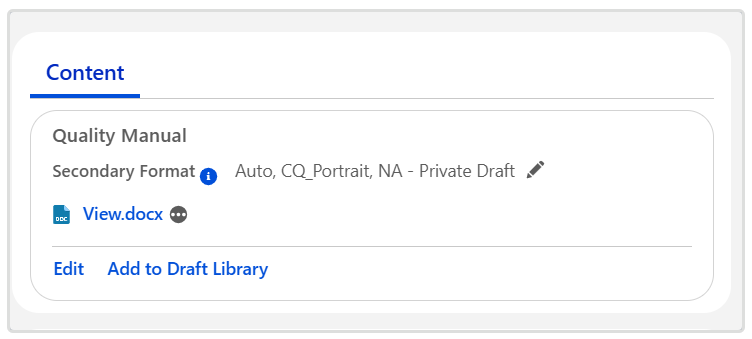
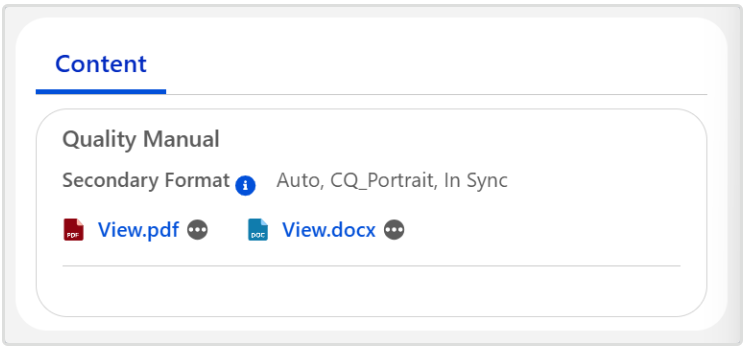
Expected Outcome
-
The Primary File has moved to the Draft Library and can now be accessed by Users who have access to the Draft Library.
-
If the Secondary Format is selected as Auto the PDF file will automatically render and a new link is displayed, allowing the Document Owner to Generate Secondary Format again if needed.
Additional Resources
ComplianceQuest
We Value Your Feedback
To provide feedback or suggestions to improve the help content on this page click here.