
Purpose
As a myCQ User, you can select the most appropriate Nonconformance Description before completing NC creation.
Prerequisites
Installed Package(s): CQ Core, CQ.AI Extension
Product: QualityQuest, Platform & Technology
Function: CQ.AI Agent
User Profile: Standard User
Permissions: CQ Base User PSG, CQ NC Owner PSG, CQ Design Owner PSG, Prompt Template User, Data Cloud User, CQSS AI User PSG
Steps
-
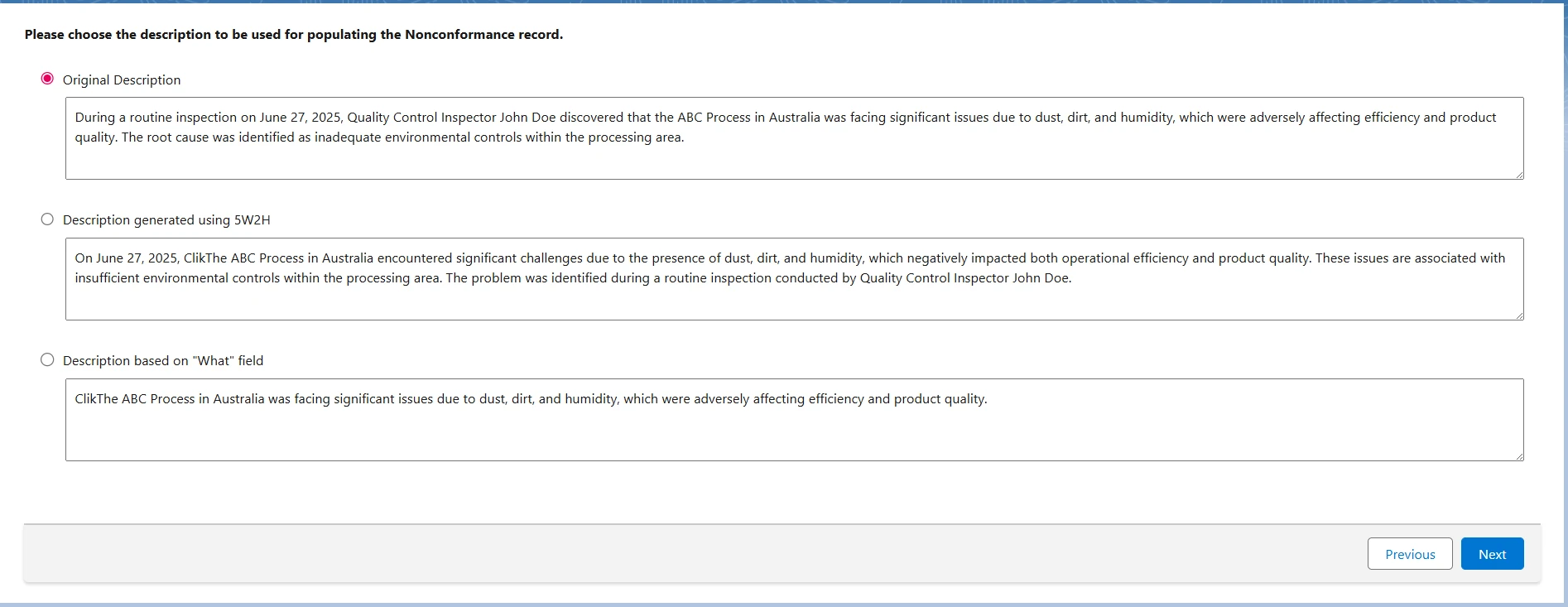
Click Next on the 5W2H Classification page.
Example:
-
Review the Original Description, which is selected by default.
-
(Optional) Select Description generated using 5W2H to use the structured version.
-
(Optional) Select Description based on "What" field to use the concise summary.
Expected Outcome
-
Three description formats appear side by side:
-
Original Description
-
5W2H‑Based Description
-
“What” Field Summary
-
-
Each option includes a clear label.
-
You can select the description that meets reporting needs.
-
The Original Description is selected by default unless configured otherwise.
-
Administrators can enable auto‑selection or skip this step.
-
These options support consistent documentation across user groups.
Additional Resources
ComplianceQuest
We Value Your Feedback
To provide feedback or suggestions to improve the help content on this page click here.