
Purpose
As a Record Owner, you complete Product History Checklists to document required responses during a product history review. You record the checklist answers and confirm completion so the review can move forward in the complaint workflow.
Prerequisites
Installation Package: CQ Core, CQ Regulatory Reports Extension, CQ AS2 Gateway Extension, myCQ Extension, and CQ AI Extension
Product: QualityQuest and Platform Apps
Function: CQ Product History Checklist Completion
User Profile: Standard User
Permissions: CQ Base User PSG, CQ Complaint Non DT Task Assignee PSG
Configurations: CQ Tasks
Steps
-
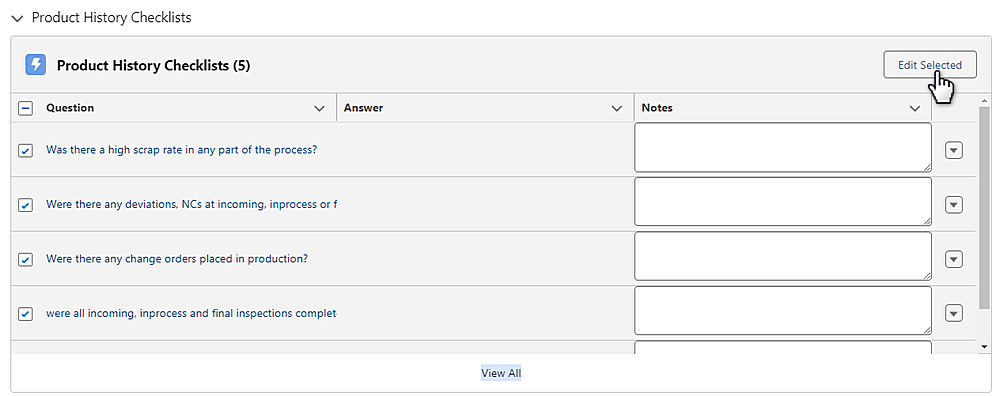
From the Product History Review record, click the Product History Checklists section.
-
Check all Questions and click the Edit Selected button. Questions can also be answered individually using the Edit option available from the drop-down arrow at the end of each Question row.
-
Answer each Question under the checklist.
-
Optionally, enter the Notes.
-
Click the Save button.
Example:
Expected Outcome
-
You record the required checklist responses for the Product History Review and confirm the checklist is complete.
Additional Resources
ComplianceQuest
We Value Your Feedback
To provide feedback or suggestions to improve the help content on this page click here.