
Purpose
As a Record Owner, you complete the disposition approval to confirm the decision for handling the nonconforming product or process. You review the disposition details, record the approval, and update the status so the nonconformance can move to the next step.
Prerequisites
Installation Package: CQ Core, myCQ Extension, CQ Supplier Central, CQ Supplier Performance, CQ Ratings Framework, CQ Embedded Analytics, and CQ AI Extension
Product: QualityQuest and Platform Apps
Function: CQ Disposition Approval Completion
User Profile: Standard User
For Permission Set Groups: CQ Base User PSG, CQ NC Approver PSG
Steps
-
From the Home tab, click the Approve/Reject link for the NC record in the CQ Items section.
-
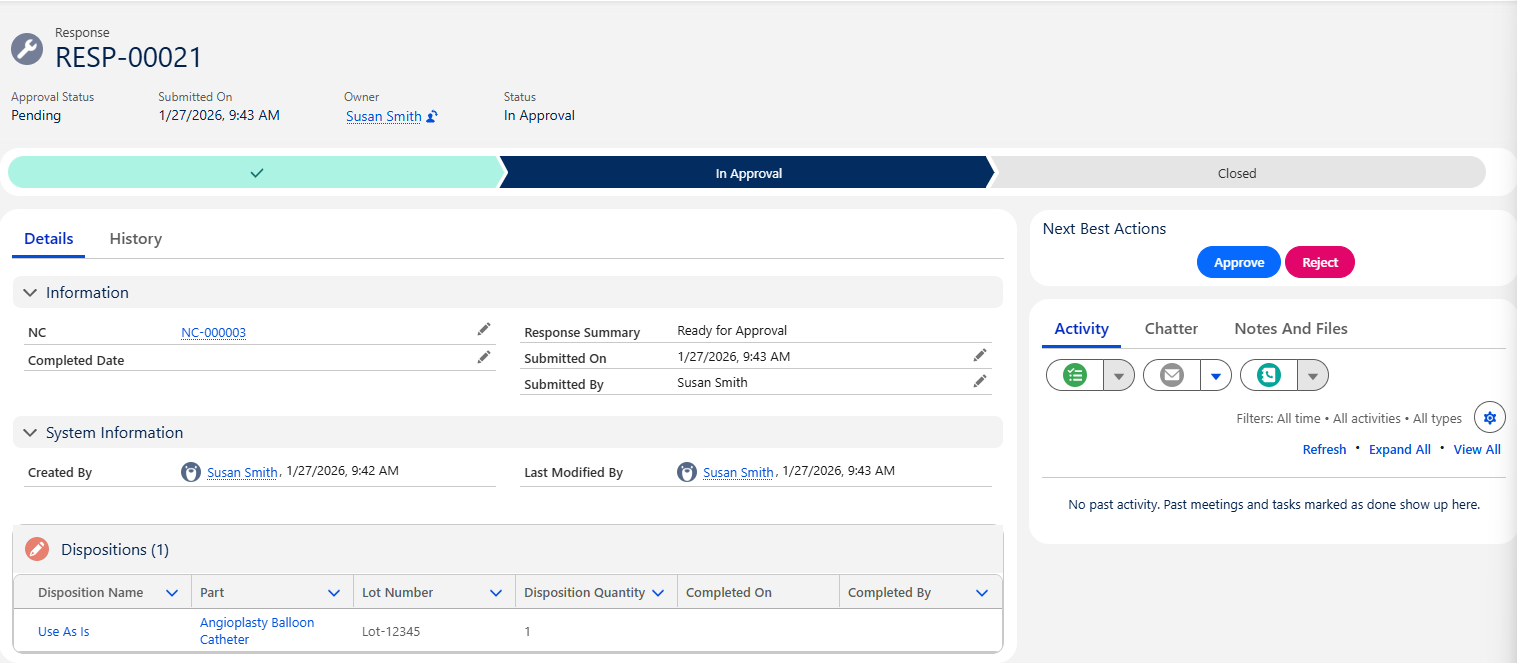
From Next Best Actions, click the Approve or Reject button.
-
Enter Comment and Password if needed, and click the Approve or Reject button.
Example:
Expected Outcome
Dispositions Approved
-
The Disposition Approval Status displays as Approved or Rejected or Partially Approved and the NC remains in the Disposition/Investigate Stage.
-
The NC Owner receives an email notification that the Response has been approved and a link is provided to access the record.
-
Approving Response is logged in the Nonconformance Record Activities section under the History tab.
-
All Dispositions approved will have a new Status as Open or Complete (if already completed) under the Disposition tab. See Completing Dispositions.
Dispositions Rejected
-
The Disposition Approval Status displays as Rejected and the NC remains in the Disposition/Investigate Stage.
-
The NC Owner receives an email notification that the Response has been rejected and a link is provided to access the record.
-
Rejecting Response is logged in the Nonconformance Record Activities section under the History tab.
-
The NC Owner needs to update and resubmit the Disposition for approval based on rejection remarks.
Additional Resources
ComplianceQuest
We Value Your Feedback
To provide feedback or suggestions to improve the help content on this page click here.