
Overview
Approvals may be recalled to correct errors, update content, add missing information, reassign to the correct approver, comply with new requirements, or attach supporting evidence. They can also be withdrawn if the process changes or is canceled.
The recall function allows record owners to withdraw the approval request before the process is completed, enabling updates or corrections to the record. Proper use of this feature ensures accuracy, maintains compliance, and prevents unnecessary delays in the approval workflow.
Prerequisites
Available in: All Records with Approvals
Installed Package: CQ Approval - Winter 2025
User Profile: Standard User
Permissions: CQ Base User PSG and CQ Record Owner PSG
Users: Active Users for Approval assignments
CQ Record: Must indicate an ‘Approval’ Stage
Instructions
-
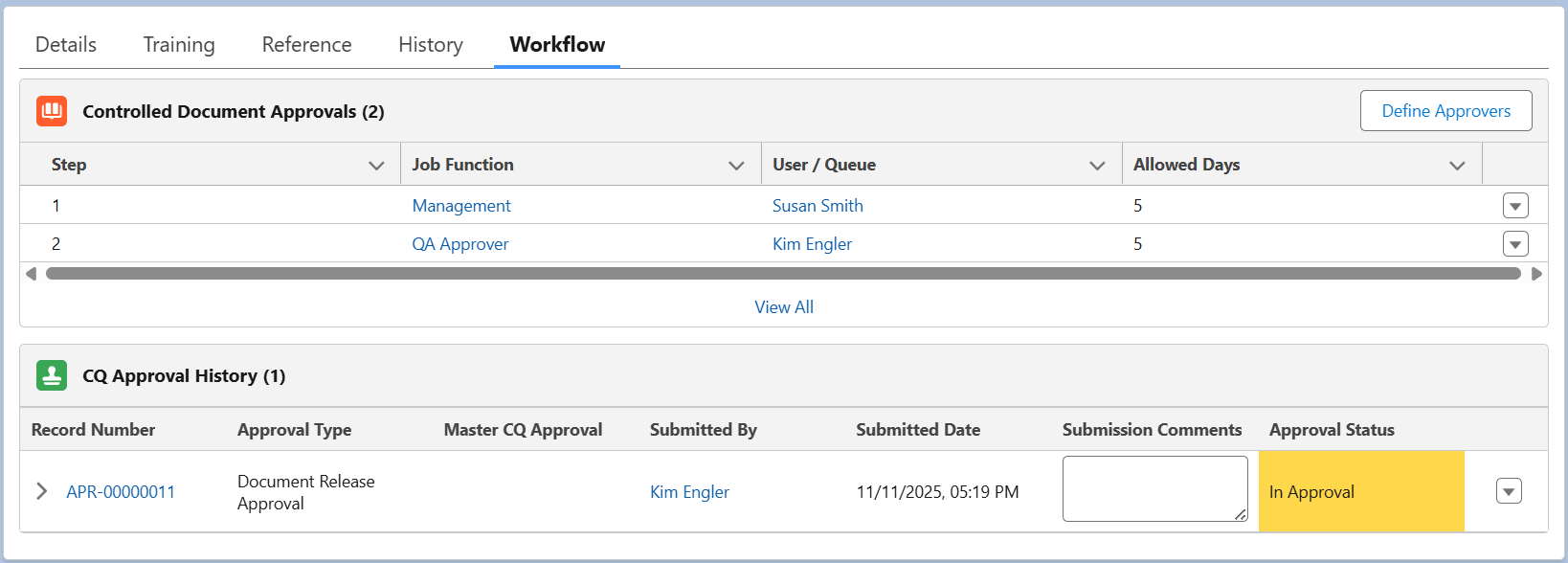
Click the Workflow tab of the record under the current Approval Status (i.e., Release Approval).

-
From the CQ Approval History section, select the Recall quick action for the approval type with the status of In Approval.

-
Enter Comment and Password if required for eSignature Policies.
-
Click the Recall Approval Request button.


-
Make appropriate changes and re-submit the Approval.
-
Next Step: Submitting Approvals.
Results
-
The Approval Status now indicates Recalled for the CQ record.
-
The Approval Task is removed from the Approvers To Do list on the Home tab.
-
An email is sent to ALL Approver(s) notifying that the Approval has been recalled.
-
Recalling Record activity is logged and can be viewed for the CQ record under the History tab.
Troubleshooting
-
Check back for new articles
Additional Resources
CQ Resources
-
Submitting Approvals
Summer 2026